WAVELET SYNTHESIZER · USER MANUAL B

ENGINE BWavelet Additive

Engine B builds sounds the other way round. Instead of starting from a waveform and taking detail away, you write the detail directly. An ATOM PATTERN decides the sign — and for RANDOM, the size — of every one of the 2047 atoms that make up a waveform cycle; the WAVELET gives those atoms their shape; eleven DRAWBARS set the level of each band, one octave of harmonics each, like the drawbars of an organ; and a SCALE ENVELOPE gives every band its own attack and decay, so the fine detail can bloom later or die sooner than the body of the sound. The shared SUB OSC, SCALE FILTER, POSITION window, envelopes, LFO 1 and LFO 2, voice and effects sections then shape the result.

For the web app and the VST3 plugin for Ableton Live (Windows and macOS)Version beta 0.7 · 2026-10-18Engine A · Wavelet Subtractive — read Manual A

1The idea in one minute

Partials versus atoms

Classic additive synthesis builds a sound from sine waves: one oscillator per harmonic, each with its own level and envelope. It is powerful but laborious — a bright tone needs dozens of partials — and every partial lasts for the whole cycle, so there is no way to say where in the waveform something happens.

Engine B adds up wavelet atoms instead. An atom is a short wiggle of a fixed shape — the wavelet — and atoms come in sizes an octave apart: one atom spanning the whole cycle, two spanning half of it each, then four, eight … down to 1024 tiny atoms spaced two samples apart. All atoms of one size form a band, and each band covers about one octave of harmonics. Instead of setting dozens of sine levels you set eleven band levels, and the pattern of the atoms inside each band decides the waveform.

Fourier view versus wavelet view: 11 bands with 1 to 1024 atomsFOURIER VIEWeach partial lasts the whole cycleh1h2h3h4h5h6h7h8h9h10h11startend of cycleh = harmonic numberWAVELET VIEW · the grid of atomseach band ≈ one octave; finer bands: more, shorter atomsB11 atomB22 atomsB34 atomsB48 atomsB516 atomsB632 atomsB764 atomsB8128 atomsB9256 atoms256 atoms · too small to draw one by oneB10512 atoms512 atoms · too small to draw one by oneB111024 atoms1024 atoms · too small to draw one by one0°180°360°finer atoms · higher harmonicsHighlighted: the first atom of every band — the only atomsthat the IMPULSE pattern switches on.
Figure 1. Left: in the Fourier view each harmonic spans the whole cycle. Right: the grid of atoms of one cycle — 11 bands, from one atom in band 1 to 1024 in band 11. The panel’s SCALOGRAM draws this grid live, with the brightness of each atom.
  • One cycle = 2048 samples = 2047 atoms (1 + 2 + 4 + … + 1024) in 11 bands.
  • Band b has 2b−1 atoms. Band 1 is about the fundamental, band 2 the 2nd harmonic, band 3 harmonics 3–4, band 4 harmonics 5–8 … each band is about one octave of harmonics.
  • The ATOM PATTERN sets the sign (and for RANDOM the size) of every atom, the WAVELET sets their shape, and the DRAWBARS, TILT, SCALE ENVELOPE and SCALE FILTER set the level of each band.

Engine B turns each band into its own waveform layer, scales it so that its peak is exactly 1, and mixes the 11 layers at audio rate with the band levels you set.

Where the bands are

The cycle is played back at the pitch of each note (it is pitch-synchronous), so the bands are relative to the note: band 4 is always about harmonics 5–8, whatever key you press. In hertz, the bands move with the note:

BandAtomsHarmonics (≈)At C2 (65 Hz)At C4 (262 Hz)At C6 (1047 Hz)
B11165 Hz262 Hz1.05 kHz
B222131 Hz523 Hz2.09 kHz
B343–4196–262 Hz785 Hz – 1.05 kHz3.14–4.19 kHz
B485–8327–523 Hz1.31–2.09 kHz5.23–8.37 kHz
B5169–16589 Hz – 1.05 kHz2.35–4.19 kHz9.42–16.7 kHz
B63217–321.11–2.09 kHz4.45–8.37 kHz—
B76433–642.16–4.19 kHz8.63–16.7 kHz—
B812865–1284.25–8.37 kHz——
B9256129–2568.44–16.7 kHz——
B10512257–512———
B111024513–1024———

“—” = not played at that pitch (see below). Values are for the smooth wavelets; Haar and the short Daubechies bands overlap more with their neighbours.

To keep high notes free of aliasing, each band layer is stored in eleven band-limited versions, one per octave, and every note uses the version whose harmonics stay below the sample rate minus 19 kHz (about 25 kHz at 44.1 kHz, 29 kHz at 48 kHz) — anything that folds back lands above 19 kHz. The consequence is musical: the finest bands only exist on low notes. Every octave down adds one band. At 48 kHz, band 7 is the highest band played for notes from about A♯3 to A4, band 8 an octave lower, band 9 two octaves lower; band 10 needs notes below about 57 Hz and band 11 below 28 Hz. (At 44.1 kHz the limits are about a whole tone lower.)

TIP

The drawbars follow the same rule. At middle C only drawbars 1–7 are heard; drawbars 8–11 add detail to bass notes only. When you build a registration, play it across the keyboard.

The wavelet chooses the atom

The WAVELET selector (shared by both engines) decides what the atoms look like — and in engine B, the colour of every band. Seven classic wavelets are available, from the 2-tap Haar step to the 40-tap Daubechies 20:

Figure 2. One atom of each wavelet, as drawn by the ATOM SHAPE display. “Taps” is the length of the wavelet filter.
WaveletTapsCharacter
Haar2Each band is a square-wave pattern: hard, bright, chip-like. RAMP + TILT −6 dB/band builds an exact sawtooth staircase.
Daubechies 24Short and lopsided: buzzy, slightly metallic band timbres.
Daubechies 48A good all-rounder; bands still carry a few neighbouring harmonics.
Daubechies 816Smooth bands; the octave structure becomes clear and organ-like.
Symlet 816Like Daubechies 8 but almost symmetric: a little rounder.
Coiflet 318Nearly symmetric and very smooth for its length.
Daubechies 2040Each RAMP band is practically a pure sine at its octave: the cleanest drawbar-organ sound.

Short wavelets are precise in time — clicks stay sharp, the POSITION window has crisp borders — but each band also spills into its neighbouring octaves. Long wavelets keep every band within its octave: with the RAMP pattern a Daubechies 20 band is practically a single sine.

Signal flow

Signal flow of engine BBUILT WHEN YOU CHANGE PATTERN · SEED · WAVELETATOM PATTERNPATTERN · SEEDsets every atom of the 11 bandsINVERSE WAVELET TRANSFORMWAVELET · one waveform per band11 BAND LAYERSeach normalised to peak 1band-limited tablesFOR EVERY VOICE, AT AUDIO RATEPLAY AT NOTE PITCHOCTAVE · FINE · GLIDEBEND · LFO 1 PITCHBAND GAINSDRAWBARS × TILT × SCALE ENVELOPE× SCALE FILTER, then ÷ sum of levelsENV AMT (MOD ENV) · LFO 1 CUTOFFPOSITION (FOCUS)band 1 + window ×bands 2–11UNISONup to 4 copies per noteUNISON · DETUNE · STEREO+ SUB OSCone per note, centred, not filteredLEVEL · OCT · SHAPEAMP ENVELOPEADSR × VELOCITYALL VOICES TOGETHERSUM OF VOICESSATURATIONCHORUSPING-PONG DELAYREVERBVOLUME · LIMITEROUT
Figure 3. Engine B, from atom pattern to output. Amber boxes are the wavelet-specific stages.
  • Table building happens only when you change PATTERN, SEED or WAVELET: the pattern writes the atoms, an inverse wavelet transform turns each band into a waveform layer, and each layer is normalised to a peak of 1. The switch to new tables is crossfaded, so you can change these controls while playing.
  • Every voice plays the 11 layers at its own pitch and mixes them with gains made of the drawbar level, the TILT, the band’s SCALE ENVELOPE and the SCALE FILTER. The POSITION window can then restrict bands 2–11 to part of the cycle.
  • All voices are summed and pass through the effects — saturation, chorus, delay and reverb, in that order — a DC blocker, the master volume and a soft limiter that keeps the output below 0 dBFS.
A BEAUTIFUL CONSEQUENCE

A sawtooth built from square waves

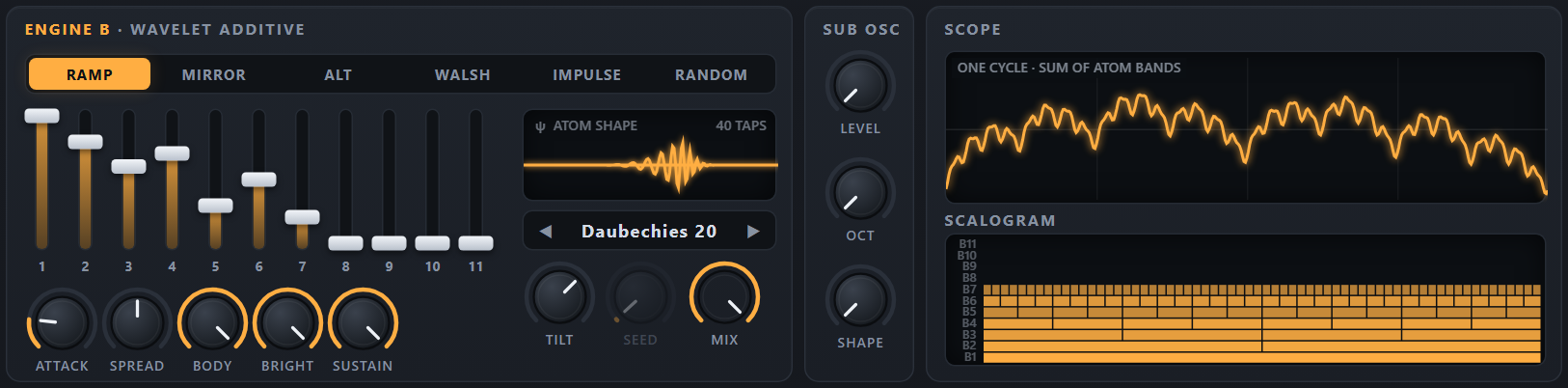
With the Haar wavelet and the RAMP pattern every band is a square wave: band 1 at the fundamental, band 2 at twice that frequency, band 3 at four times … each one twice as fast as the one below. Now set TILT to −6 dB per band, which halves the level from one band to the next. Squares whose frequency doubles while their level halves add up to a staircase that gets finer with every band — and converges to a perfect sawtooth. The −6 dB per octave of the tilt is exactly the 1/n law of a sawtooth’s harmonics: measured over the first 16 harmonics, the full eleven-band staircase matches a sawtooth to within a fraction of a decibel.

That is the preset B · Init. Pull the drawbars down from the right and the steps get coarser; drawbar 1 alone is a plain square wave.

Figure 4. Haar + RAMP + TILT −6 dB/band with more and more drawbars up (computed with the instrument’s own code). Each added band doubles the number of steps.

2Quick start

From closed to sounding in five steps — pick the column for the version you use.

Web app BROWSER

  1. Double-click web/index.html to open it in Chrome or Edge (Firefox also works; MIDI keyboards are best supported in Chrome and Edge). No installation and no web server are needed.
  2. The welcome window opens (beta 0.6): click Play the synth — or Run the demo to hear a tour of the presets first. Browsers only allow sound after a click, so this click starts the audio. The status bar turns green: Audio on · 48.0 kHz.
  3. The app always opens on A · Warm Pad. In the header, click B · ADDITIVE, then step to B · Init with the preset arrows ◀ ▶ (or click the preset name to pick from the list).
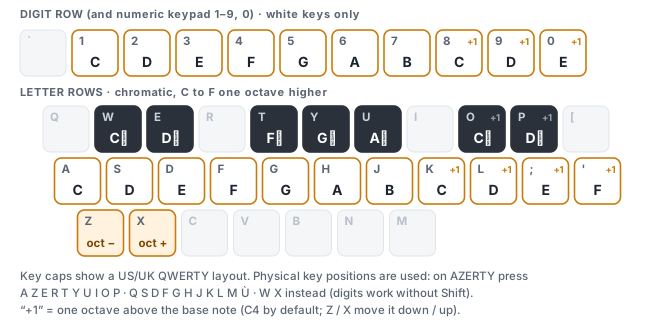
  4. Play: click the on-screen keys (lower on a key = louder), press the digit keys 1 … 0 or the letter row A S D F …, or play a MIDI keyboard.
  5. Hold a note and pull the drawbars down one by one, starting from drawbar 7: the sawtooth loses brightness step by step until drawbar 1 alone leaves a square wave. Then click the PATTERN buttons to hear the other atom patterns.

Ableton Live VST3 / VST2

  1. Download the plug-in from its release page (the web app’s DOWNLOAD VST button opens it) and unzip it. Copy the whole WaveletSynthesizer.vst3 folder into your VST3 folder (C:\Program Files\Common Files\VST3; vst\install.bat does it and asks for administrator rights) or into the VST2 plug-in folder you use in Live: the same folder works in both.
  2. In Live open Preferences → Plug-ins, switch on Use VST3 Plug-in System Folders (VST3) or Use VST2 Plug-in Custom Folder (VST2) and click Rescan.
  3. In Live’s browser open Plug-ins → OktoPierre → Wavelet Synthesizer and drag it onto a MIDI track. A new instance starts on A · Warm Pad.
  4. Arm the track and play your MIDI keyboard, or press M to use Live’s Computer MIDI Keyboard.
  5. Click B · ADDITIVE in the plugin header, choose B · Init from the preset menu (click the preset name) and repeat step 5 of the web column.
The welcome window of the web app (beta 0.6). Browsers only allow sound after a click, and each choice is that click: Run the demo starts the audio and the default demo, Play the synth starts the audio and closes the window, Download the VST opens the plug-in’s release page in a new tab (the window stays). The links at the bottom open the two manuals. The VST3 plugin needs no such step.
  • Run the demo plays the default demo — Beethoven’s Appassionata as a tour of the presets, about two minutes — exactly as ▶ DEMO in the header does (see Demo).
  • Play the synth (“MIDI supported”) only starts the audio: no note is played. Then play with the mouse, the computer keyboard or a MIDI keyboard.
  • Download the VST opens the release page of the free plug-in (Windows VST3 / VST2, macOS VST3) in a new tab; the welcome window stays open.
  • A click outside the window also starts the audio. The window comes back, with a message in place of its sub-title, when another window or tab of the app takes the audio (see One window at a time).
TIP

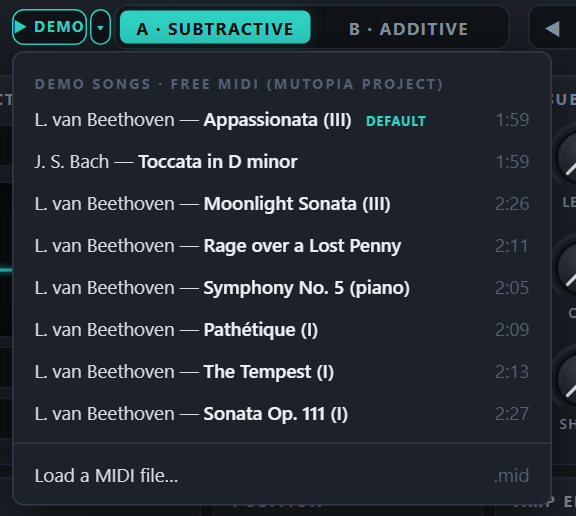
Want to hear what the instrument can do first? Choose Run the demo in the welcome window, or click ▶ DEMO next to the logo later: a Beethoven sonata movement plays while the factory presets change every few seconds. The ▾ beside it opens more pieces — see Demo.

3Panel tour

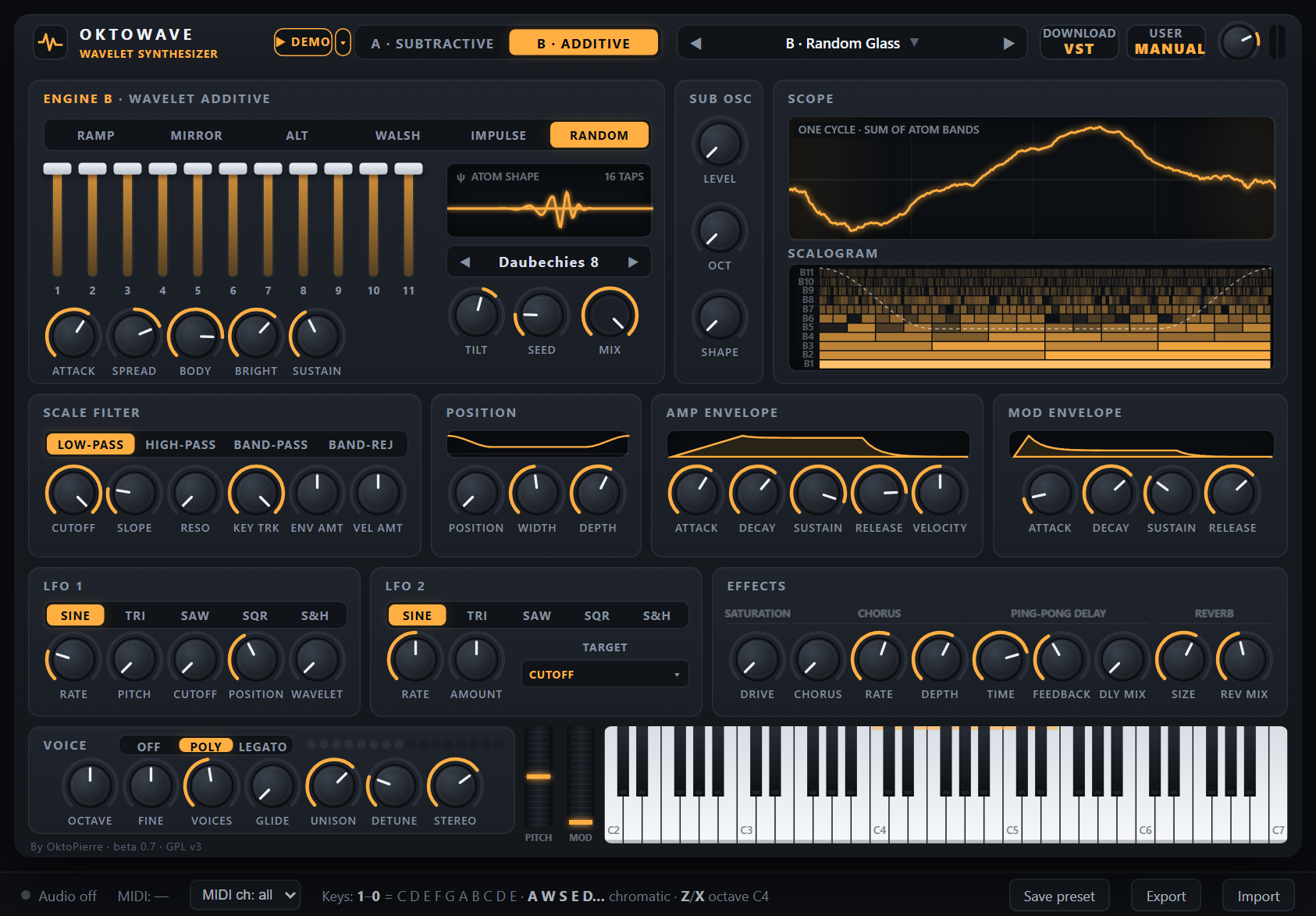
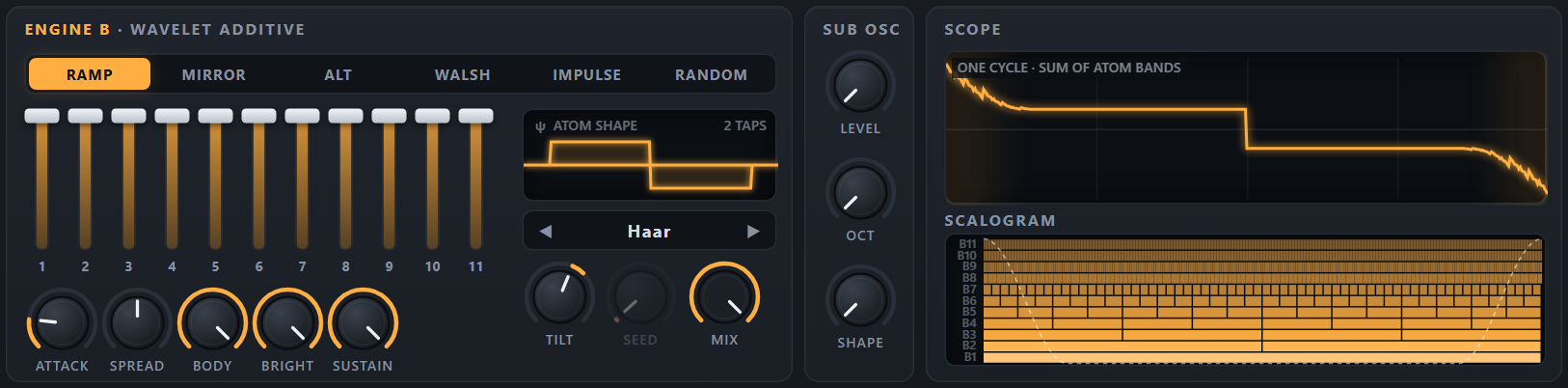
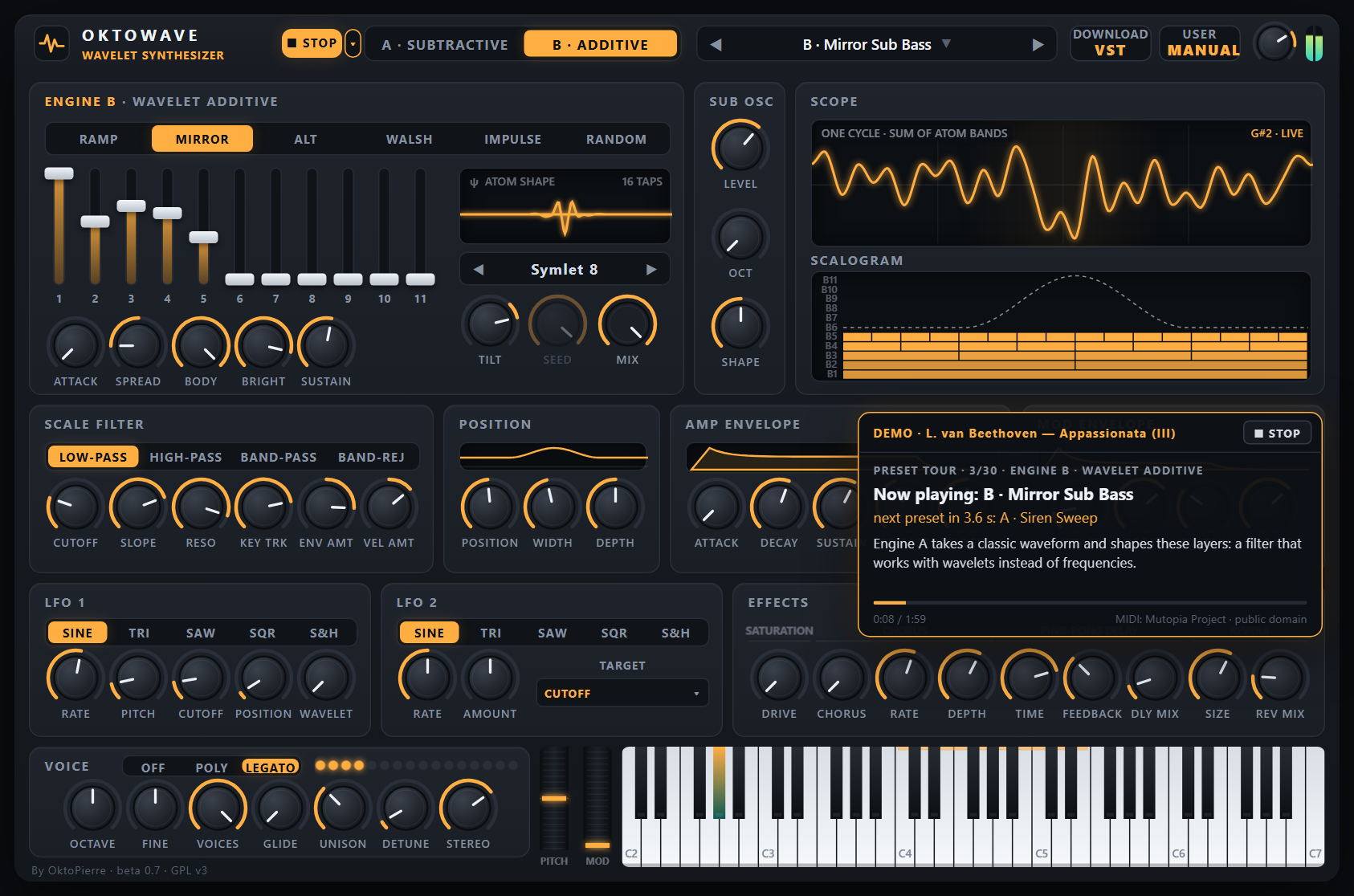
The panel is the same in the web app and the plugin, apart from a few buttons: the web app’s ▶ DEMO and DOWNLOAD VST, the plugin’s window-size button, SAVE PRESET and the SYNC buttons of the tempo sync. From top to bottom (beta 0.6): the header; the engine section, SUB OSC and SCOPE; SCALE FILTER, POSITION and the two envelopes; LFO 1, LFO 2 and EFFECTS; VOICE, the wheels and the keyboard (beta 0.7: a taller bottom row, with the credit line “By OktoPierre · beta 0.7 · GPL v3” under VOICE). In engine B mode the accent colour is amber and the upper-left section shows the ENGINE B controls. The screenshot shows the factory preset B · Random Glass; click a number to jump to its description.

The web app in engine B mode. The status bar at the bottom exists only in the web app.
  1. 1▶ DEMO ▾ (web app) — ▶ DEMO plays the default demo, a tour of the presets; ▾ opens the list of demo pieces.
  2. 2ENGINE — chooses the engine panel shown, A (teal) or B (amber); A/B MIX sets what you hear.
  3. 3Preset browser — ◀ ▶ step through the presets; click the name for the list.
  4. 4DOWNLOAD VST (web app) — opens the release page of the free plug-in; the plugin has SAVE PRESET here.
  5. 5MANUAL — opens the manual of the engine shown: this one, or Manual A on the A tab.
  6. 6VOLUME and meter — master level and stereo peak meter.
  7. 7PATTERN — writes the signs (or random values) of all atoms.
  8. 8DRAWBARS 1–11 — the level of each band, coarse (1) to fine (11).
  9. 9SCALE ENVELOPE — ATTACK, SPREAD, BODY, BRIGHT and SUSTAIN for the bands.
  10. 10ATOM SHAPE — one atom of the selected wavelet.
  11. 11WAVELET — chooses the atom shape (seven wavelets).
  12. 12TILT — a dB-per-band slope across the drawbars.
  13. 13SEED — picks the random pattern (RANDOM only).
  14. 14A/B MIX — what you hear: engine A, engine B or both mixed.
  15. 15SUB OSC — LEVEL, OCT and SHAPE of the sub oscillator, one above the other (beta 0.7).
  16. 16SCOPE — one cycle of the sound; shaded area = window.
  17. 17SCALOGRAM — the atoms of the 11 bands; dashed line = window.
  18. 18SCALE FILTER — a modulatable per-band filter on top of the drawbars.
  19. 19POSITION — lets the detail sound only in part of the cycle.
  20. 20AMP ENVELOPE — loudness ADSR and velocity sensitivity.
  21. 21MOD ENVELOPE — ADSR that moves the filter cutoff.
  22. 22LFO 1 — shape, RATE and how far it moves the pitch, cutoff, position and wavelet morph; SYNC in the plugin.
  23. 23LFO 2 — a second LFO on the parameter chosen in its TARGET menu; SYNC in the plugin.
  24. 24EFFECTS — saturation, chorus, ping-pong delay and reverb, in the order of the sound; the delay’s SYNC in the plugin.
  25. 25CHORUS — string-machine triple chorus: amount, RATE and DEPTH.
  26. 26VOICE — portamento mode and voice LEDs in its title row; octave, tuning, polyphony, glide and unison below.
  27. 27Wheels — pitch bend and modulation (vibrato).
  28. 28Keyboard — five octaves; click lower on a key to play louder.
  29. 29Status bar (web app) — audio and MIDI status, key help, Save preset / Export / Import.

The header

  • ▶ DEMO (web app only) plays the default demo, a piece during which the factory presets change every few seconds; the ▾ beside it opens the other demo pieces and lets you load your own MIDI file — see Demo.
  • A · SUBTRACTIVE / B · ADDITIVE chooses which engine section is shown in the upper left (and the accent colour). What you hear is set by the MIX knob at the right of that section — engine A, engine B, or both mixed (see Mixing engines A and B). The sub oscillator, filter, position, envelopes, LFOs, voice and effects are shared by both engines.
  • The preset browser shows the current preset; a dot after the name means it has been modified. See Browsing and saving presets.
  • DOWNLOAD VST (web app only, beta 0.6) opens the release page of the free plug-in — Windows VST3 / VST2 and macOS VST3 — in a new tab. In the plugin, SAVE PRESET sits there (see the plugin’s differences).
  • MANUAL (beta 0.6: one button instead of MANUAL A and MANUAL B) opens the manual of the engine shown — Manual A on the A · SUBTRACTIVE tab, this manual on B · ADDITIVE; each manual links to the other. In the web app it opens as an overlay (close it with ✕, Esc or a click outside; “Open in new tab” pops it out), in the plugin in your web browser.
  • The small knob at the right is the master VOLUME (−36 to +6 dB, default −3 dB), followed by the stereo output meter. In the plugin, a size button next to the logo opens a menu of window sizes (70–150 %).

Working with the controls

GestureEffect
Drag up / downChanges the value. A full sweep takes about 180 pixels of mouse travel on a knob (120 on a drawbar).
Shift + dragFive times finer adjustment; you can press or release Shift during the drag.
Mouse wheelSmall steps of 1 % of the range (0.2 % with Shift). Stepped controls such as OCTAVE, VOICES, UNISON and SEED move one step.
Double-click, or Ctrl + clickResets the control to its default value (⌘ + click on a Mac).
HoverThe label under a knob shows the current value with its unit; drawbars and the header VOLUME knob show a tooltip instead.
Segmented buttonsClick a choice; the lit button is active.
WAVELET ◀ ▶Previous / next wavelet (wraps around). Clicking the name also steps to the next one.
Greyed-out controlHas no effect with the current settings: SEED only works with the RANDOM pattern.
Arc from the centreBipolar controls (FINE, ENV AMT, VEL AMT, OCTAVE, TILT, SPREAD) draw their value arc from zero.
Panel sizeThe web app scales the whole panel to the browser window. In the plugin, the small size button next to the logo opens a menu of window sizes from 70 % to 150 %.

4Engine B: atoms, drawbars, scale envelope

The ENGINE B section is where the sound is built: choose an atom pattern and a wavelet, balance the bands with the drawbars and TILT, and give the bands their own time behaviour with the SCALE ENVELOPE.

ControlRange · defaultWhat it doesTip
PATTERNhost: Atom PatternRAMP · MIRROR · ALT · WALSH · IMPULSE · RANDOMdefault RampWrites every atom of the 11 bands — see Atom patterns.The pattern sets the harmonic structure; the drawbars set the balance.
SEEDhost: Random Seed0 – 99default 1Chooses one of 100 repeatable random patterns. Only active with RANDOM (greyed out otherwise).Hover and roll the mouse wheel to audition seeds one by one.
WAVELEThost: WaveletHaar · DB2 · DB4 · DB8 · Sym8 · Coif3 · DB20default Daubechies 4The shape of the atoms — see The wavelet chooses the atom. Shared with engine A.Haar = square-wave bands; Daubechies 20 = sine-like bands.
WAVELET 2host: Wavelet 2Haar · DB2 · DB4 · DB8 · Sym8 · Coif3 · DB20default HaarWAVELET MORPH (beta 0.3) also acts on engine B: its bands are built with WAVELET 2 as well and crossfaded by MORPH, LFO 1 (its WAVELET knob) and the mod envelope (ENV>WAV). WAVELET 2, MORPH and ENV>WAV are on the engine A panel.Show the engine A panel to set them; the WAVELET knob of LFO 1 is on both panels.
1 … 11host: Band 1 Level … Band 11 Level0 – 100 % eachdefault 100 %The eleven drawbars: the level of each band, from band 1 (the fundamental, left) to band 11 (the finest atoms, right).Drag vertically or use the mouse wheel; double-click resets a drawbar to 100 %.
TILThost: Tilt−24 … +12 dB/banddefault −6.0 dB/bandA slope across the drawbars: band b gets TILT × (b − 1) dB extra. 0 = flat; −6 dB/band halves the level from band to band (the sawtooth law); positive values favour the fine bands.−3 for bright, −9 to −12 for mellow sounds.
ATTACKhost: Scale Attack1 ms – 5 sdefault 5.0 msAttack time of the SCALE ENVELOPE for the middle band (band 6). SPREAD derives the other bands’ attack times from it.
SPREADhost: Attack Spread−100 … +100 %default 0%Spreads the attack times over the bands. Positive values make the fine bands slower (detail arrives last), negative values make them faster. At ±100 % band 11 takes 4 × / ¼ × ATTACK and band 1 the opposite.+50 to +100 % for pads that “open” without a filter.
BODYhost: Body Decay10 ms – 20 sdefault 20.00 sDecay time of band 1 — the body of the sound.Longer than BRIGHT for natural plucks and bells.
BRIGHThost: Bright Decay10 ms – 20 sdefault 20.00 sDecay time of band 11 — the finest detail. Bands in between get decay times spaced evenly between BODY and BRIGHT on a logarithmic scale.0.05–0.5 s for strikes and plucks.
SUSTAINhost: Scale Sustain0 – 100 %default 100%The level all bands decay to and hold while the key is down. 100 % = no decay at all.With 0 % the note fades even while held.

Atom patterns

The PATTERN buttons fill the 2047 atoms with one of six recipes. The pattern decides which harmonics each band contains and how they line up in time; the wavelet decides how sharp or smooth each atom is.

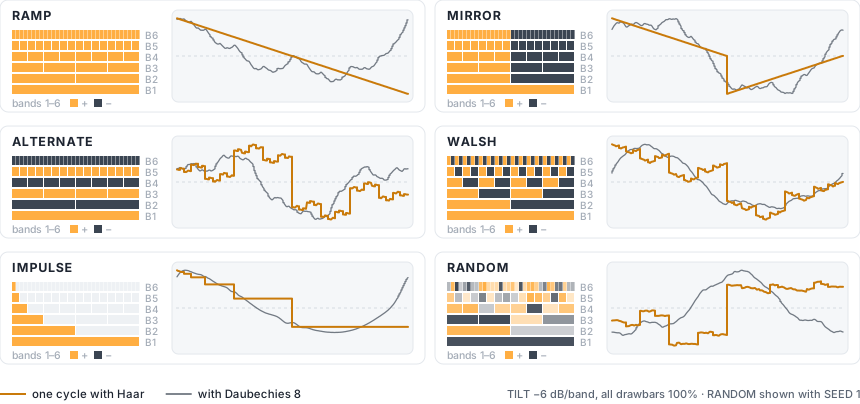
Figure 5. The six patterns. Left: the signs of the atoms in bands 1–6 (the finer bands continue the same rule). Right: the resulting cycle with TILT −6 dB/band and all drawbars up, for Haar and for Daubechies 8 — computed with the instrument’s own code.
PatternAtomsSound
RAMPEvery atom +1.Each band repeats its atom over and over, so it sounds at exactly one harmonic: band b at harmonic 2b−1 (1, 2, 4, 8 …). With long wavelets these are almost pure sines — octave drawbars; with Haar they are square waves.
MIRRORBand 1: +1. Other bands: first half of the atoms +1, second half −1.The second half of the cycle becomes an upside-down copy of the first, which cancels every even harmonic: hollow, square- and clarinet-like tones.
ALTThe sign alternates from band to band: bands 1, 3, 5 … +1, bands 2, 4, 6 … −1.The same harmonic levels as RAMP with different phases. A steady tone sounds very close to RAMP, but the waveform differs — which you hear as soon as the POSITION window cuts into the cycle.
WALSHInside each band the atoms alternate +1, −1, +1 …Each band repeats only every two atoms, so it sounds an octave lower than with RAMP — band b at harmonic 2b−2; bands 1 and 2 both land on the fundamental. With Haar the bands are Walsh functions, the square-wave building blocks of early digital synthesis: hollow, buzzy chip-tune timbres.
IMPULSEOnly the first atom of each band is on.All the detail sits at the very start of the cycle: a click at the beginning of every period, on top of band 1. Rich in every harmonic — bright, nasal, buzzy; ideal for plucks. Since every band is normalised to peak 1, the tiny fine atoms are as loud as the big ones: tame the click with TILT or a short BRIGHT.
RANDOMEvery atom gets a random value between −1 and +1; SEED (0–99) picks the set.All harmonics in an irregular mix: glassy, vocal or metallic depending on wavelet and drawbars. Each seed is a different timbre, and the same seed always gives the same one.
NOTE

After the transform, every band layer is scaled so that its peak is exactly 1. A drawbar at 100 % therefore always means “this band at full scale”, whatever the pattern, and the patterns differ in tone colour rather than in level.

Drawbars and tilt

The eleven drawbars set the level of each band, much like the drawbars of a tonewheel organ — except that each drawbar is a whole octave of harmonics rather than a single sine. With the RAMP pattern and a long wavelet they really are octave-pitched organ drawbars:

Drawbar1234567
RAMP partialfundamental2nd4th8th16th32nd64th
Organ footage8′4′2′1′½′¼′⅛′

There are no fifths or thirds (the 5⅓′, 2⅔′, 1⅗′ and 1⅓′ drawbars of a tonewheel organ), because every band is an octave. With Haar, each band is a square wave and adds its odd multiples — a reedier sound.

B · Octave Organ: Daubechies 20 + RAMP, drawbars 100/80/60/70/30/50/20 % and the rest down. The SCALOGRAM shows the seven active bands.

TILT adds a slope across the drawbars: band 1 is the reference and every band above gets TILT dB more (or less) than the one below. At −6 dB/band the level halves from band to band; at 0 all drawbars count equally; positive values brighten the sound and are best used sparingly (+1 to +3), because at +12 dB/band band 11 would be 120 dB above band 1.

Level normalisation. To keep the output out of clipping, the mix is divided by the sum of the drawbar levels (after TILT) whenever that sum is above 1. With TILT −6 dB/band and all drawbars up the sum is about 2; with TILT 0 and all drawbars up it is 11, so each band plays at 1/11 of full scale. Two consequences: pulling one drawbar down makes the others a little louder, so the overall level stays similar; and a flat, all-up registration is quieter than you might expect — raise VOLUME or use a negative TILT.

UNDER THE HOOD
gain(b) = DRAWBAR(b) × 10^(TILT × (b − 1) / 20) × scale envelope(b) × filter(b) ÷ max(1, Σ DRAWBAR × 10^(TILT × (b − 1) / 20))

The scale envelope and the SCALE FILTER are not part of the divisor, so they make the sound quieter and darker exactly as you would expect.

Scale envelope

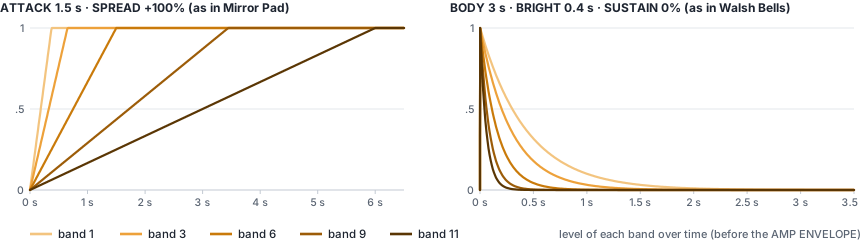
The SCALE ENVELOPE gives every band its own envelope. When a note starts, all bands begin at zero and rise linearly to full level, each in its own attack time; then each decays exponentially, at its own speed, towards SUSTAIN, where it stays while the key is held. There is no separate release: when you let go, the AMP ENVELOPE fades the whole sound while the bands keep moving towards SUSTAIN.

Figure 6. Levels of five bands over time, simulated with the instrument’s own envelope code. Left: a long ATTACK spread over the bands — band 1 is there after 0.4 s, band 11 after 6 s. Right: per-band decays — the finest band is gone in 0.4 s while band 1 rings for 3 s.
  • ATTACK and SPREAD. Band b rises in ATTACK × 16SPREAD × (t − ½), where t runs from 0 for band 1 to 1 for band 11. At SPREAD 0 all bands rise together in ATTACK. At +100 % band 1 takes ATTACK ÷ 4, band 6 ATTACK and band 11 ATTACK × 4: the sound opens as the detail arrives. At −100 % the detail comes first and the body follows.
  • BODY and BRIGHT. Band 1 decays with BODY, band 11 with BRIGHT, and the bands in between are spaced evenly on a logarithmic scale. With BODY 3 s and BRIGHT 0.4 s: band 1 3.0 s, band 3 2.0 s, band 6 1.1 s, band 9 0.6 s, band 11 0.4 s. Times are measured to −60 dB of the distance to SUSTAIN.
  • SUSTAIN is the level every band settles at; 100 % means no decay at all.
  • The defaults — ATTACK 5 ms, SPREAD 0 %, BODY and BRIGHT 20 s, SUSTAIN 100 % — make the scale envelope practically neutral: a 5 ms fade-in.
  • Real strings, bells and plucked sounds lose their upper harmonics faster than their fundamental. A BRIGHT time shorter than BODY reproduces exactly that, and is why engine B plucks and bells sound physically plausible.
  • A note played legato in mono mode does not restart the scale envelope; a voice that is re-triggered while still sounding restarts its attacks from the current band levels.
  • The SCOPE and SCALOGRAM follow the scale envelope live while you play.

5Scale filter

In engine B the SCALE FILTER multiplies the band levels set by the drawbars, the TILT and the SCALE ENVELOPE. Think of it as a second set of drawbars that you can move with an envelope, an LFO, velocity and the keyboard. Its default CUTOFF of 12 is fully open, so you can ignore it until you want brightness that changes over time or with playing strength.

The level normalisation of engine B (see Drawbars and tilt) is computed before the filter, so closing the filter really makes the sound darker and quieter — exactly as you would expect from a subtractive filter.

ControlRange · defaultWhat it doesTip
TYPEhost: Filter TypeLOW-PASS · HIGH-PASS · BAND-PASS · BAND-REJdefault Low-passShape of the gain curve over the bands. LOW-PASS keeps the coarse bands and removes fine detail; HIGH-PASS keeps the fine bands and removes the body; BAND-PASS keeps about one band around the cutoff; BAND-REJ removes the band at the cutoff (a notch).Band-pass on a low cutoff (2–3) gives thin, nasal tones; high-pass at 3–4 makes airy layers.
CUTOFFhost: Cutoff0 – 12default band 12.0Where the filter acts, in bands: 1 = the fundamental, 11 = the finest atoms, 12 = beyond the finest band — a low-pass is fully open there. Fractional values blend smoothly between bands.Default 12 = fully open. For a classic filter pluck start around 2–3 with a positive ENV AMT.
SLOPEhost: Slope6 – 96 dB/banddefault +24.0 dB/bandHow steeply bands beyond the cutoff are attenuated. One band ≈ one octave, so 24 dB/band behaves like a classic 4-pole (24 dB/octave) filter; 6 is gentle, 96 is a brick wall. For BAND-REJ it sets the notch width instead: the higher the slope, the narrower the notch.Steep slopes make the filter act like a fader that switches whole drawbars on and off.
RESOhost: Resonance0 – 24 dBdefault 0.0 dBBoosts the bands around the cutoff by up to 24 dB (a bell about ±0.6 band wide). It is a band boost, not feedback, so it never self-oscillates. Ignored by BAND-REJ.Resonance adds level (up to +24 dB at the cutoff band): keep an eye on the meter.
KEY TRKhost: Key Tracking0 – 100 %default 100%100 %: the cutoff follows the note, so every key has the same tone colour — the natural behaviour of this pitch-synchronous engine. 0 %: the cutoff stays at a fixed frequency referenced to C4 (261.63 Hz): every octave above C4 lowers the cutoff by one band, every octave below raises it by one.50 % gives the familiar “darker as you go up” feel of an analogue filter.
ENV AMThost: Envelope Amount−11 … +11 bandsdefault 0.0 bandsHow far the MOD ENVELOPE moves the cutoff: −11 to +11 bands at the envelope’s peak. Positive values open the filter, negative values close it.+4 to +6 bands with a short mod decay = the classic filter pluck.
VEL AMThost: Velocity Amount−6 … +6 bandsdefault 0.0 bandsVelocity → cutoff. The shift is amount × (velocity − 1): a note at full velocity is not shifted; softer notes move the cutoff by up to the amount — down for positive amounts, up for negative ones.+2 to +3 bands: soft notes darker, hard notes open.

LFO 1 CUTOFF adds a further ± bands of periodic movement, and LFO 2 can move CUTOFF or another filter control — see LFO 1 and LFO 2.

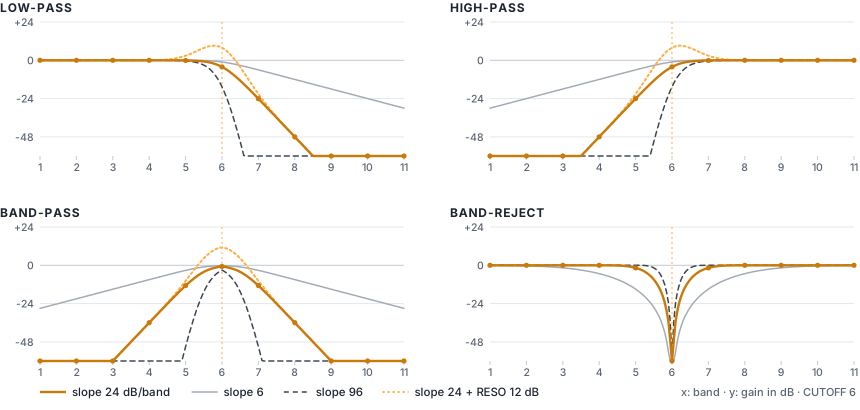
Gain curves of the four filter types at cutoff 6
Gain per band at CUTOFF 6, computed with the instrument’s own filter code. Dots mark the gain actually applied to bands 1–11 at 24 dB/band. Note the soft knee: the band at the cutoff is already a little attenuated.

The four types in numbers

  • Low-pass — bands below the cutoff pass untouched; the band at the cutoff is about 0.17 × SLOPE down (−4 dB at 24 dB/band); each band further up loses about SLOPE dB more. At CUTOFF 12 (the default) every band is within 0.1 dB at 24 dB/band (0.4 dB at 96 dB/band): fully open.
  • High-pass — the mirror image: bands above the cutoff pass, bands below lose about SLOPE dB per band.
  • Band-pass — keeps a window about one band wide: at 24 dB/band the cutoff band is −0.8 dB, its neighbours −13 dB, two bands away −36 dB.
  • Band-reject — removes the band at the cutoff completely. The notch width depends only on SLOPE: at 6 dB/band it hollows out two or three bands on each side, at 24 its neighbours are only 1.6 dB down, at 96 nothing but the exact band is touched. With steep slopes, a cutoff between two bands (say 5.5) hardly notches anything — use whole numbers.
  • Resonance — adds up to +24 dB centred on the cutoff, falling off over about ±1 band. With a low-pass at 24 dB/band and RESO 12 dB, the cutoff band ends up at about +8 dB.
UNDER THE HOOD

The cutoff actually used for each voice, recomputed every 32 samples and smoothed sample by sample:

cutoff = CUTOFF + ENV AMT × mod envelope + LFO 1 CUTOFF × LFO 1 + VEL AMT × (velocity − 1) + (1 − KEY TRK) × log₂(261.63 Hz ÷ note frequency)

The mod envelope runs from 0 to 1, LFO 1 from −1 to +1 and velocity from 0 to 1. The note frequency includes OCTAVE, FINE, pitch bend and vibrato. The result is not clamped to 0–12, so modulation can push the filter past fully closed or past fully open.

6Position window

Atoms live at definite places in the cycle, so engine B can decide where the detail is allowed to exist. With the POSITION window you keep the coarse band 1 everywhere but let bands 2–11 sound only in part of the cycle. The result is a moving “focus” — a kind of formant or pulse-width effect that is locked to the pitch.

ControlRange · defaultWhat it doesTip
POSITIONhost: Position0° – 360°default 0°Centre of the window inside the cycle, from 0° (start of the cycle) to 360° (end — the same point as 0°).With IMPULSE all detail sits at 0°: a window at 180° hides it.
WIDTHhost: Window Width5 – 100 %default 50%How much of the cycle the window covers (the full width of its raised-cosine bump). 100 % = a smooth bump over the whole cycle that only reaches zero opposite the centre.Narrow windows (5–20 %) are automatically widened on high notes to avoid aliasing.
DEPTHhost: Window Depth0 – 100 %default 0%How strongly the window restricts the detail. 0 % = window off, all bands everywhere. 100 % = bands 2–11 exist only inside the window; outside it only band 1 sounds.In between, the area outside the window gets a blend.
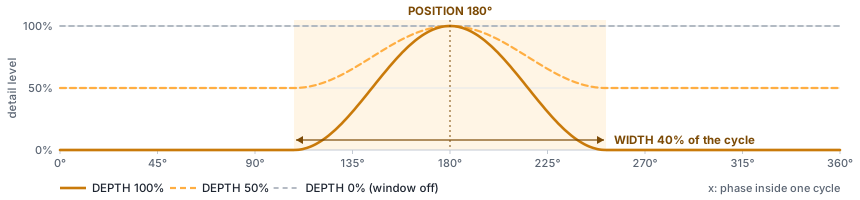
Position window curve for three depth settings
The window W over one cycle for POSITION 180°, WIDTH 40 % and three depths. The panel’s WINDOW display draws the same curve.
UNDER THE HOOD
W(φ) = (1 − DEPTH) + DEPTH × bump(φ) bump = raised cosine of total width WIDTH, centred on POSITION
output(φ) = band 1(φ) + W(φ) × [bands 2 … 11](φ)

φ is the position inside the cycle. Because the window is locked to the cycle, the result is still perfectly periodic — it changes the timbre, it never adds noise or detuning.

Focus Sweep preset: scope and scalogram with a 30% window at 0 degrees
B · Focus Sweep at rest: outside the 30 % window (centred on 0°, wrapping round the cycle edge) only band 1 — a square with Haar — remains; inside, the full staircase detail returns. An LFO sweeps the window around the cycle while you play.

High notes and modulation

A narrow window multiplies the sound by a short bump, which adds high harmonics. To keep this alias-free, the window is automatically widened on high notes: it is never narrower than 16 × note frequency ÷ sample rate of the cycle — about 9 % at C4 and 35 % at C6 (48 kHz). The minimum WIDTH of 5 % is only reached below about 150 Hz.

LFO 1 POSITION moves the window up to ±180° — all the way round the cycle — and is only audible when DEPTH is above 0 %. The SCOPE shades the window and the SCALOGRAM draws it as a dashed line.

7Envelopes

Two ADSR envelopes run for every voice. The AMP ENVELOPE shapes the loudness; the MOD ENVELOPE moves the filter cutoff, by the amount set with ENV AMT in the SCALE FILTER (it has no other destination and ignores velocity — use VEL AMT for velocity-dependent brightness). Engine B adds a third, per-band envelope — the SCALE ENVELOPE — which shapes every band separately before the AMP ENVELOPE shapes the whole.

AMP ENVELOPE

ControlRange · defaultWhat it doesTip
ATTACKhost: Amp Attack1 ms – 10 sdefault 3.0 msTime to rise linearly from silence to full level.1–5 ms is click-free for most sounds; 0.3–1 s for pads.
DECAYhost: Amp Decay1 ms – 10 sdefault 400 msTime to fall from full level to the SUSTAIN level. Exponential: the time given is the time to fall by 60 dB of the remaining distance, so the curve looks finished after about half of it.For plucks set SUSTAIN to 0 % and use DECAY as the note length.
SUSTAINhost: Amp Sustain0 – 100 %default 80%Level held while the key (or the sustain pedal) is down.
RELEASEhost: Amp Release1 ms – 10 sdefault 300 msTime to fade by 60 dB after the key is released. The voice is freed at −100 dB.Long releases overlap: raise VOICES for pads.
VELOCITYhost: Amp Velocity0 – 100 %default 50%How much velocity sets the loudness: level × (1 − VELOCITY × (1 − velocity)). 0 % = every note equally loud; 100 % = loudness proportional to velocity.The computer keyboard always plays at velocity 80 %.

MOD ENVELOPE

ControlRange · defaultWhat it doesTip
ATTACKhost: Mod Attack1 ms – 10 sdefault 3.0 msAttack of the modulation envelope (linear).A slow mod attack (50–150 ms) gives brassy swells.
DECAYhost: Mod Decay1 ms – 10 sdefault 500 msDecay to the mod SUSTAIN level (exponential, −60 dB time).
SUSTAINhost: Mod Sustain0 – 100 %default 30%Mod level held while the key is down.
RELEASEhost: Mod Release1 ms – 10 sdefault 500 msMod release after the key is released.
  • Attacks are linear; decays and releases are exponential, which sounds natural and avoids clicks. The small curve above the knobs shows the shape on a logarithmic time axis, so short and long settings are both readable.
  • Playing a note on a voice that is still sounding restarts the attack from the current level, without a click.
  • With VOICES at 1 (mono, legato), notes played while another key is held do not restart the envelopes.
  • For plucks and bells in engine B, give the AMP ENVELOPE a long decay and let BODY and BRIGHT in the SCALE ENVELOPE do the shaping: the fine bands can then die away before the body, as in a real string.

8LFO 1 and LFO 2

Two LFOs sit side by side in the third row of the panel (beta 0.6): LFO 1 at the left, with its shape tabs and five knobs — RATE, then how far it moves the PITCH, the CUTOFF, the POSITION window and the WAVELET morph; LFO 2 at its right, the same size, moves one parameter chosen in its TARGET menu. Both are shared by all voices. They run freely and are not restarted by new notes, so in a chord every voice moves together — ideal for pads and vibrato. For a movement that starts with each note, use the MOD ENVELOPE instead.

LFO 1

ControlRange · defaultWhat it doesTip
SHAPEhost: LFO 1 ShapeSINE · TRI · SAW · SQR · S&Hdefault SineThe tabs under the title: SINE, TRI (triangle), SAW (ramps down, then jumps up), SQR (square) and S&H (sample & hold: a new random value once per LFO cycle).S&H on CUTOFF or POSITION gives random, stepped timbres.
RATEhost: LFO 1 Rate0.05 – 20 Hzdefault 4.0 HzSpeed, from one cycle every 20 s to 20 cycles per second (logarithmic taper). In the plug-in, with SYNC on, a note value at the host’s tempo instead — see Tempo sync.5–6 Hz for vibrato; 0.1–0.5 Hz for slow sweeps.
PITCHhost: LFO 1 to Pitch0 – 100 centsdefault 0 ctVibrato depth: the pitch moves by up to ± this many cents (100 = ± one semitone).The mod wheel adds up to 50 cents of extra depth.
CUTOFFhost: LFO 1 to Cutoff0 – ±6 bandsdefault ±0.0 bandsMoves the cutoff by up to ± this many bands.With the default CUTOFF 12 there is little to sweep: lower CUTOFF first.
POSITIONhost: LFO 1 to Position0 – ±180°default ±0°Moves the POSITION window by up to ± this many degrees; ±180° travels all the way round the cycle. Only audible when DEPTH is above 0 %.See the “Focus sweep” recipe.
WAVELEThost: LFO 1 to Wavelet Morph0 – 100 %default 0%WAVELET MORPH (beta 0.3): moves the morph between WAVELET and WAVELET 2 by up to this amount, around the MORPH position (kept within 0–100 %). Needs a WAVELET 2 different from WAVELET.With the same LFO on CUTOFF, the timbre and the filter move together (preset “A · Wave Wobble Bass”).

The mod wheel (on screen or MIDI CC 1) always acts through LFO 1: it adds up to 50 cents of vibrato depth on top of PITCH, using the current SHAPE and RATE. With PITCH at 0, the wheel alone brings in vibrato.

LFO 2 (beta 0.3)

A second free-running LFO, in the card at the right of LFO 1, moves one parameter of the SCALE FILTER or of the POSITION window (or engine A’s PHASE) — the one chosen in its TARGET menu. Like LFO 1 it is shared by all voices. beta 0.6: the card has the size of LFO 1’s, with the same shape tabs.

ControlRange · defaultWhat it doesTip
TARGEThost: LFO 2 TargetCUTOFF · SLOPE · RESO · KEY TRK · ENV AMT · VEL AMT · POSITION · WIDTH · DEPTH · PHASEdefault CutoffWhat LFO 2 moves — the TARGET menu at the right of the card: CUTOFF, SLOPE, RESO, KEY TRK, ENV AMT or VEL AMT of the SCALE FILTER, POSITION, WIDTH or DEPTH of the POSITION window, or (beta 0.4) the engine A PHASE — SOURCE PHASE: the wave moves inside the cycle and the timbre scans through the colours of the shift-variant wavelet transform (see Manual A, Source phase). The mouse wheel on the menu steps through them.LFO 1 already has CUTOFF and POSITION: give LFO 2 another target (RESO, WIDTH…) for two independent movements.
SHAPEhost: LFO 2 ShapeSINE · TRI · SAW · SQR · S&Hdefault SineThe same five shapes as LFO 1, chosen with the same tabs under the title (beta 0.6; a knob before): SINE, TRI, SAW, SQR, S&H.S&H on RESO gives a random, talking resonance.
RATEhost: LFO 2 Rate0.05 – 20 Hzdefault 1.0 HzSpeed, from one cycle every 20 s to 20 cycles per second (logarithmic taper), independent of LFO 1. In the plug-in, with SYNC on, a note value at the host’s tempo instead — see Tempo sync.A rate that does not divide LFO 1’s makes the two movements drift against each other.
AMOUNThost: LFO 2 Amount−100 … +100 %default 0%How far the target moves: up to ± this share of half its range (100 % on CUTOFF = ±6 bands, on POSITION or PHASE = ±180°, on RESO = ±12 dB), kept within the control’s range. Negative values move it the other way; 0 % (the default) switches LFO 2 off.Start around 20–30 % and listen while you raise it.

Tempo sync (plug-in only, beta 0.6)

In the plug-in (VST3 and VST2), a SYNC button sits at the right of the LFO 1 and LFO 2 titles. When it is lit, that LFO’s RATE knob becomes a note value at the host’s tempo — Ableton Live’s or your DAW’s; 120 BPM when the host gives none — and shows the value as its label, for example “1/8D”. One LFO cycle then lasts that note value, and the speed follows the tempo changes of the song. The delay has the same button: see Delay tempo sync.

ControlRange · defaultWhat it doesTip
SYNC (LFO 1)host: LFO 1 Syncoff · ondefault offPlug-in only: the button at the right of the LFO 1 title. Lit: RATE becomes a note value at the host’s tempo (next row).Switching SYNC off brings back the RATE in hertz: the two values are kept apart.
RATE (SYNC on)host: LFO 1 Rate (sync)4/1 · 2/1 · 1/1 · 1/2D · 1/2 · 1/4D · 1/2T · 1/4 · 1/8D · 1/4T · 1/8 · 1/16D · 1/8T · 1/16 · 1/16T · 1/32default 1/4The length of one LFO 1 cycle, as a note value. The knob shows it as its label.1/4 at 120 BPM = 2 Hz; 1/16 = 8 Hz.
SYNC (LFO 2)host: LFO 2 Syncoff · ondefault offThe same for LFO 2: the button at the right of the LFO 2 title.
RATE (SYNC on)host: LFO 2 Rate (sync)4/1 · 2/1 · 1/1 · 1/2D · 1/2 · 1/4D · 1/2T · 1/4 · 1/8D · 1/4T · 1/8 · 1/16D · 1/8T · 1/16 · 1/16T · 1/32default 1/4The length of one LFO 2 cycle, as a note value.With both LFOs synced, their speeds keep the same ratio at any tempo.
  • Note values, from slow to fast: 4/1 2/1 1/1 1/2D 1/2 1/4D 1/2T 1/4 1/8D 1/4T 1/8 1/16D 1/8T 1/16 1/16T 1/32. 4/1 = four whole notes (four bars of 4/4) per cycle; T = triplet (2/3 of the note), D = dotted (1.5 × the note).
  • Speed, not phase. SYNC sets the speed only: the LFO keeps running freely and is not restarted on the beat or the bar.
  • Off by default. SYNC is off in every factory preset, so older presets, plug-in states and Live Sets sound the same as before.
  • Web app. A browser page gets no tempo: the web app has no SYNC buttons and its RATE stays in hertz.

9Voice

The VOICE section sits at the bottom left, before the wheels and the keyboard (beta 0.6): the portamento selector and the voice LEDs in its title row, its seven knobs below. The small credit line under it reads “By OktoPierre · beta 0.7 · GPL v3” (beta 0.7).

ControlRange · defaultWhat it doesTip
PORTAMENTOhost: PortamentoOFF · POLY · LEGATOdefault POLYWhen notes glide from one pitch to the next; GLIDE sets how long a glide takes (at 0 nothing glides). OFF: never. POLY: polyphonic portamento — every voice glides from its own previous note (details below). LEGATO: only when the new note starts while another key is still held; in poly the new note glides from the held (most recent) note, exactly like a mono legato line. With VOICES at 1, POLY glides from the previous note every time and LEGATO only on tied notes; returning to a still-held note after releasing the top one glides too, unless the selector is OFF.Most presets leave GLIDE at 0: raise it to hear the portamento. LEGATO is the expressive choice for leads, POLY for gliding chords.
OCTAVEhost: Octave−3 … +3default 0Transposes the instrument by whole octaves.
FINEhost: Fine Tune−100 … +100 centsdefault 0 ctFine tuning in cents (100 cents = one semitone).
VOICEShost: Voices1 – 16default 8Maximum number of notes sounding at once. At 1 the instrument is monophonic and legato, with last-note priority.Long releases and reverb-like pads need 8 voices or more.
GLIDEhost: Glideoff – 2 sdefault offPortamento time: how long a glide takes; 0 (shown as “off”, the setting of most presets) means no portamento at all. The pitch slides exponentially; the value is the time to cover about 99 % of the interval. Whether a note glides at all is decided by the OFF / POLY / LEGATO selector.30–80 ms for leads; 200 ms+ for dramatic slides.
UNISONhost: Unison1 – 4default 1Number of stacked copies of every note (1–4).UNISON multiplies CPU load: 8 voices × 4 copies = 32 oscillators.
DETUNEhost: Unison Detune0 – 50 centsdefault +12 ctSpread of the unison copies: the outer copies are at ± this many cents, the others evenly in between.8–15 cents for warmth, 20+ for supersaw-style width.
STEREOhost: Stereo Width0 – 100 %default 70%Spreads the unison copies across the stereo field, from centre (0 %) to hard left and right (100 %).No effect with UNISON 1.
  • Voice allocation. When all voices are busy, a new note takes over the oldest released voice first, then the oldest held one. Playing a note that is already sounding re-uses its voice.
  • Mono and legato. With VOICES at 1, holding a note and playing another changes the pitch without restarting the envelopes (it glides if GLIDE is above zero and the portamento selector is not OFF). Release the new note while still holding the first and the pitch returns to the first one. Legato means that another key is still physically held: with the sustain pedal down but no key held, a new note restarts the envelopes.
  • Polyphonic portamento (POLY). With GLIDE above 0, every voice glides from its own previous note. Playing one note at a time, the new note glides from the previous one (the voice of the last note is reused) while the release tails of older notes keep sounding. Playing chords, each new note takes the free voice whose last pitch is nearest, so chord changes glide voice by voice — from C–E–G to F–A–C, G slides to F, E to A, and C stays on C. A voice that has to be stolen glides from wherever it currently is.
  • Level. Each note plays at about −8 dB to leave headroom for chords, and unison copies are scaled by 1/√n so that stacking keeps the loudness roughly constant.
  • Voice LEDs. The 16 dots show the voices: dim = available, lit = sounding (including release tails). They sit to the right of the portamento selector, in the title row of VOICE.

10Sub oscillator

The SUB OSC section adds a simple oscillator one or two octaves below every note — the classic way to give a sound more low end, from a warm bass foundation to infra-bass you feel rather than hear. It sits in the top row, between the engine section and the SCOPE (beta 0.6; it was at the bottom before): its three knobs one above the other, LEVEL, OCT and SHAPE (beta 0.7; LEVEL was a large knob before).

ControlRange · defaultWhat it doesTip
LEVELhost: Sub Level0 – 100 %default 0%Level of the sub oscillator. 0 % (the default) switches it off; 100 % is about as loud as the main additive sound at full scale.Start around 30–50 % for basses, and watch the meter: the sub adds a lot of energy.
OCThost: Sub Octave−1 octave · −2 octavesdefault −1 octaveHow far below the played note the sub sounds: one or two octaves. It follows the pitch exactly, including OCTAVE, FINE, glide, pitch bend and vibrato.−2 octaves on low notes goes below 20 Hz: felt more than heard.
SHAPEhost: Sub ShapeSine · Triangle · Squaredefault SineWaveform of the sub: a pure sine; a soft triangle (odd harmonics that fall quickly); or a square with strong odd harmonics, band-limited with PolyBLEP so it does not alias.On small speakers choose TRI or SQR: their harmonics stay audible when the fundamental is too low to be reproduced.
  • One sub per voice. Every note gets one sub oscillator, centred in the stereo field — not one per unison copy, so UNISON, DETUNE and STEREO neither thicken nor spread it.
  • Outside the wavelet engine. The sub is added after the drawbars, TILT, SCALE ENVELOPE, SCALE FILTER and POSITION window, so none of them affects it: it stays clean and steady while you sweep the wavelet sound. Then the AMP ENVELOPE (and velocity) shapes it like the rest of the note, and it goes through the effects — DRIVE saturates it too.
  • How low? On C2 (65 Hz) the sub sits at 33 Hz (−1 octave) or 16 Hz (−2 octaves); with OCTAVE at −1 it goes one more octave down. Below about 20 Hz you feel rather than hear it, and laptop speakers, small monitors and most headphones cannot reproduce it at all. The output’s 10 Hz DC blocker softens the very lowest frequencies (about −1.5 dB at 16 Hz, −4 dB at 8 Hz).
  • The SCOPE and SCALOGRAM show the wavelet sound only; the sub is not drawn.

11Mixing engines A and B

Since beta 0.2 the two engines can play together. The MIX knob sits at the right of both engine sections, so it is always in reach.

ControlRange · defaultWhat it doesTip
MIXhost: A/B MixA … Bdefault AWhat you hear: at A only engine A (wavelet subtractive), at B only engine B (wavelet additive), in between both at once — the display reads for example “A 60 · B 40”.Start from a preset of one engine and turn MIX slowly: the other engine fades in under it.
  • The tabs choose the panel, MIX chooses the sound. A · SUBTRACTIVE and B · ADDITIVE only choose which engine section is shown, to edit it; switching them neither changes the sound nor marks the preset as modified. Turn MIX towards A, then click A · SUBTRACTIVE to shape the subtractive layer.
  • One note, two layers. Each note plays engine A’s filtered source and engine B’s atoms at the same pitch, with the same AMP ENVELOPE, glide, unison and effects. Both layers go through the SCALE FILTER (engine B also keeps its drawbars, TILT and SCALE ENVELOPE) and through the POSITION window. The sub oscillator is added once, whatever the mix.
  • Linear crossfade. At “A 50 · B 50” each layer plays at half level, so the mix stays about as loud as either engine alone. Turning MIX while notes sound is smoothed (20 ms) and does not click.
  • Cost. In between, every voice is computed twice, so the CPU load roughly doubles. The tables of the second engine are built when MIX leaves A or B (and dropped when it returns there), with the same 10 ms crossfade as the other table changes.
  • Older sounds. Presets, user presets and Live Sets made before beta 0.2 have no MIX: they get MIX = their engine and sound exactly as before. The factory presets that mix both engines are named “AB · …”.
  • The SCOPE and SCALOGRAM show the engine whose panel is open.

12Effects and master

The EFFECTS section, at the right of the third row, shows the effects in the order of the sound, each under its heading (beta 0.6): SATURATION (DRIVE) · CHORUS (CHORUS, RATE, DEPTH — they had their own card before) · PING-PONG DELAY (TIME, FEEDBACK, DLY MIX) · REVERB (SIZE, REV MIX). They process the sum of all voices — wavelet sound and sub oscillator together — in this order: saturation → chorus → ping-pong delay → reverb → DC blocker → master volume → soft limiter. The delay and reverb mix knobs add the effect on top of the unchanged dry sound (there is no dry/wet crossfade), so raising them also makes the sound a little louder. The reverb receives the echoes of the delay as well.

ControlRange · defaultWhat it doesTip
DRIVEhost: Drive0 – 100 %default 0%Saturation: blends in a smooth tanh soft-clipper driven by up to +24 dB, with automatic level compensation. 0 % = bypassed.20–40 % thickens basses and Haar sounds.
CHORUShost: Chorus0 – 100 %default 0%Amount of chorus: 0 % switches it off (the default), 100 % keeps only the three chorus lines. See Chorus below.60–90 % gives the classic string-machine shimmer; 30–40 % just widens a lead or keys.
RATEhost: Chorus Rate0.1 – 3 Hzdefault 0.70 HzSpeed of the chorus’s slow sweep (0.1–3 Hz). A second, fast sweep runs at about 9.7 times this rate with a smaller depth — the two together make the “ensemble” movement.Around 0.5–0.8 Hz sounds like the string machines of the 1970s; above 1.5 Hz it becomes a vibrato.
DEPTHhost: Chorus Depth0 – 100 %default 60%How far the chorus’s delay lines sweep: from 6 ms up to 12 ms at 100 %.Lower DEPTH when RATE is high, or the pitch wobble becomes obvious.
TIMEhost: Delay Time10 ms – 1 sdefault 350 msDelay time (logarithmic taper). Changing it while echoes are ringing makes them glide in pitch, like a tape delay. In the plug-in, with SYNC on, a note value at the host’s tempo instead — see Delay tempo sync.350 ms ≈ a dotted eighth at 128 BPM.
FEEDBACKhost: Delay Feedback0 – 90 %default 35%How much of each echo is fed back: more repeats. Echoes alternate between left and right and get darker with every repeat.Above 70 % the repeats last many seconds.
DLY MIXhost: Delay Mix0 – 100 %default 0%Level of the echoes added to the sound.
SIZEhost: Reverb Size0 – 100 %default 60%Reverb decay length, from a small room to a long hall.
REV MIXhost: Reverb Mix0 – 100 %default 0%Level of the reverb added to the sound.15–25 % for most sounds; 40 %+ for pads.
VOLUMEhost: Master Volume−36 … +6 dBdefault −3.0 dBMaster output level — the small knob in the header, next to the stereo meter. Hover over it to read the value.Lower it when the meter sits at the top: the output limiter is then working hard.
  • Ping-pong delay. The mono sum of the voices enters the left channel; each repeat crosses to the other side and passes a gentle low-pass, so echoes bounce between the speakers and darken as they fade.
  • Reverb. A Freeverb-style stereo reverb (eight comb and four all-pass filters per channel) with fixed high-frequency damping; SIZE sets the decay.
  • Output stage. A 10 Hz DC blocker removes any offset, then the master VOLUME is applied, then a soft limiter: it is transparent below −3 dBFS and never lets the output exceed 0 dBFS, so the instrument cannot clip your audio interface or your Live track.
  • Meter. The stereo meter shows the output peak over the top 48 dB; the top of the bars is 0 dBFS. If the bars sit near the top, the limiter is working: lower VOLUME, RESO or the number of unison copies for a cleaner sound.

Chorus (string machine)

The chorus (beta 0.2) is a triple chorus modelled on the ensemble effect of 1970s string machines. Its knobs — CHORUS (the amount), RATE and DEPTH — are the second group of the EFFECTS section, under the CHORUS heading (beta 0.6; they had their own card at the bottom before).

  • How it works. The sound (after DRIVE) feeds three short delay lines. Each is swept by the same slow and fast LFOs, shifted by 120° from one line to the next, so the three copies are never in step. They are spread left, centre and right: the result is wide and lush even from a single voice.
  • Where it sits. After the voices and the DRIVE, before the ping-pong DELAY and the REVERB — the order of a classic string machine going into an echo and a hall.
  • Mono in, stereo out. The chorus works on the mono sum of the sound; at 100 % the stereo image is made by the three lines. Lower settings keep part of the original stereo spread of UNISON and STEREO.
  • Try it on “A · String Machine”, “A · Solina Cellos”, “B · Ensemble Organ” or “AB · Analog Strings”.

Delay tempo sync (plug-in only, beta 0.6)

In the plug-in (VST3 and VST2) a SYNC button sits at the right of the PING-PONG DELAY heading. When it is lit, the delay’s TIME knob becomes a note value at the host’s tempo — Ableton Live’s or your DAW’s; 120 BPM when the host gives none — and shows the value as its label, for example “1/8D”. The echoes then follow the tempo changes of the song. The two LFOs have the same button: see Tempo sync.

ControlRange · defaultWhat it doesTip
SYNC (delay)host: Delay Syncoff · ondefault offPlug-in only: the button at the right of the PING-PONG DELAY heading. Lit: TIME becomes a note value at the host’s tempo (next row).Switching SYNC off brings back the TIME in seconds: the two values are kept apart.
TIME (SYNC on)host: Delay Time (sync)1/32 · 1/16T · 1/16 · 1/8T · 1/16D · 1/8 · 1/4T · 1/8D · 1/4 · 1/2T · 1/4D · 1/2 · 1/2D · 1/1default 1/8The time between two echoes, as a note value. The knob shows it as its label.1/8D (a dotted eighth) is the classic ping-pong rhythm.
  • Note values, from short to long: 1/32 1/16T 1/16 1/8T 1/16D 1/8 1/4T 1/8D 1/4 1/2T 1/4D 1/2 1/2D 1/1. T = triplet (2/3 of the note), D = dotted (1.5 × the note). At 120 BPM, 1/8 = 250 ms and 1/1 = 2 s.
  • Up to 4 seconds. The delay holds up to 4 s (a whole note at 60 BPM); a longer note value, at a slow tempo, is held at 4 s.
  • Off by default. SYNC is off in every factory preset, so older presets, plug-in states and Live Sets sound the same as before.
  • Web app. A browser page gets no tempo: the web app has no SYNC button and its TIME stays in seconds.

13Displays

The SCOPE section fills the top right of the panel, at the right of SUB OSC: the scope on top, the scalogram under its SCALOGRAM label (beta 0.6: the section’s title is just SCOPE; beta 0.7: the section is wider and the scope taller).

DisplayWhat it showsGood to know
SCOPEOne cycle of the sound: the sum of the band layers (“SUM OF ATOM BANDS”); shaded area = the POSITION window.At rest it shows the patch as set (cutoff, no envelopes, LFO or velocity). While you play it follows the most recent note live, tagged e.g. “C4 · LIVE”.
SCALOGRAMThe 11 bands as rows (B1 at the bottom, B11 at the top), one cell per atom. Brightness = size of the atom after the band gains, on a 60 dB scale: black = more than 60 dB down. The dashed line is the POSITION window.Fine rows have more atoms than pixels; each pixel then shows the largest atom it covers.
ATOM SHAPEOne atom of the selected wavelet (ψ) and the length of its filter in taps.Longer = smoother, more “sine-like” bands.
WINDOWThe POSITION window over one cycle. Reads “WINDOW OFF · RAISE DEPTH” while DEPTH is 0 %.
ADSR curvesThe shape of the AMP and MOD envelopes, on a logarithmic time axis.
Voice LEDsAvailable (dim) and sounding (lit) voices, to the right of the portamento selector in the title row of VOICE.
MeterLeft and right output peak, top = 0 dBFS.

The SCOPE and SCALOGRAM draw the cycle as it is stored, before the per-note band limiting described in Where the bands are; on high notes the finest rows are not actually played. The sub oscillator is not drawn.

14Sound-design recipes

Each recipe starts from a factory preset and uses only the controls on the panel. Values are what the panel shows when you hover over a control.

Drawbar organ

Start from: B · Octave Organ (or B · Init)
  1. PATTERN RAMP, WAVELET Daubechies 20, TILT 0 dB/band.
  2. Drawbars 1–7 at 100, 80, 60, 70, 30, 50 and 20 %; drawbars 8–11 at 0 %.
  3. AMP ENVELOPE: ATTACK 10 ms, DECAY 100 ms, SUSTAIN 100 %, RELEASE 80 ms.
  4. LFO 1: SINE, RATE 6 Hz, PITCH 6 cents — or leave PITCH at 0 and use the mod wheel. REV MIX 20 %.
  5. For a percussion accent: SUSTAIN 60 %, BODY 20 s, BRIGHT 250 ms — the upper bands start loud and settle quickly, the body stays.

Try next: Haar turns every band into a square wave for a reedy organ; WALSH gives a hollow combo-organ colour.

Chip-tune Walsh lead

Start from: B · Init
  1. PATTERN WALSH, WAVELET Haar, TILT 0 dB/band.
  2. Drawbars: 1 at 100 %, 2 at 50 %, 3 at 70 %, 5 at 40 %, all others at 0 %.
  3. AMP ENVELOPE: ATTACK 1 ms, DECAY 200 ms, SUSTAIN 60 %, RELEASE 50 ms. VOLUME −6 dB.
  4. VOICES 1 and GLIDE 30 ms for chip-style slides.
  5. For a fast trill: LFO 1 SQR, RATE 12 Hz, PITCH 50 cents (the pitch flips between −50 and +50 cents).

Try next: move drawbars 2 and 3 to change the Walsh “duty cycle”; add DRIVE 20 %.

Bell with per-band decays

Start from: B · Init
  1. PATTERN WALSH, WAVELET Symlet 8, TILT −3 dB/band.
  2. SCALE ENVELOPE: ATTACK 2 ms, SPREAD 0 %, BODY 3 s, BRIGHT 0.4 s, SUSTAIN 0 %.
  3. AMP ENVELOPE: DECAY 4 s, SUSTAIN 0 %, RELEASE 2 s.
  4. REV MIX 35 %.
  5. Play in the upper octaves: the bright strike fades within half a second while the body rings on.

Try next: RANDOM (try several SEEDs) for less regular, glassier bells; BRIGHT 0.1 s for a marimba-like strike.

Swelling pad with SPREAD

Start from: B · Mirror Pad
  1. PATTERN MIRROR, WAVELET Daubechies 20, TILT −5 dB/band.
  2. SCALE ENVELOPE: ATTACK 1.5 s, SPREAD +100 %, BODY and BRIGHT 20 s, SUSTAIN 100 %.
  3. AMP ENVELOPE: ATTACK 1 s, SUSTAIN 100 %, RELEASE 2 s.
  4. UNISON 4, DETUNE 18 cents, STEREO 70 %. REV MIX 50 %, VOLUME −6 dB.
  5. Hold a chord: the body is there after about 0.4 s, the finest bands only after 6 s — the pad opens slowly without any filter.

Try next: SPREAD −100 %: detail first, body last — a reversed, breathy swell.

Impulse pluck

Start from: B · Init
  1. PATTERN IMPULSE, WAVELET Daubechies 4, TILT −2 dB/band.
  2. SCALE ENVELOPE: ATTACK 5 ms, BODY 1.2 s, BRIGHT 80 ms, SUSTAIN 0 %.
  3. AMP ENVELOPE: ATTACK 1 ms, DECAY 1.5 s, SUSTAIN 0 %, RELEASE 500 ms.
  4. DLY MIX 20 %.
  5. Play: a bright click that turns into a rounder tone within a fraction of a second, like a plucked string.

Try next: Haar for harpsichord bite, Daubechies 20 for a softer pluck; CUTOFF 7 with VEL AMT +4 bands so soft notes lose their top bands.

Random glass with seeds

Start from: B · Random Glass
  1. PATTERN RANDOM, SEED 17, WAVELET Daubechies 8, TILT −4 dB/band.
  2. SCALE ENVELOPE: ATTACK 200 ms, SPREAD +50 %, BODY 6 s, BRIGHT 1.5 s, SUSTAIN 40 %.
  3. AMP ENVELOPE: ATTACK 300 ms, SUSTAIN 90 %, RELEASE 2 s. UNISON 3.
  4. POSITION DEPTH 60 %; LFO 1 SINE, RATE 0.2 Hz, POSITION ±72°. REV MIX 45 %, VOLUME −5 dB.
  5. Hold a chord, hover over SEED and roll the mouse wheel: every seed is a new, repeatable timbre.

Listen for: the slow LFO moving the 60 %-deep window makes the detail breathe around the cycle, while the spread attack lets the shimmer arrive after the body.

From square to sawtooth

Start from: B · Init
  1. PATTERN RAMP, WAVELET Haar, TILT −6 dB/band, all drawbars at 100 %.
  2. Hold a low note (around C2, where bands 1–9 sound) and pull the drawbars down one by one from drawbar 9: each removed band halves the number of steps. Drawbar 1 alone is a square wave (Figure 4).
  3. Put them back up and change TILT: −3 is brighter than a sawtooth, −9 darker, 0 a buzzy stack of equal squares.
  4. Switch WAVELET to Daubechies 20: the same registration becomes a smooth stack of octave sines — the steps were the Haar atoms.

Listen for: at middle C only drawbars 1–7 make a difference — see Where the bands are.

Focus sweep (LFO 1 → POSITION)

Start from: B · Focus Sweep
  1. PATTERN RAMP, WAVELET Haar, TILT −3 dB/band.
  2. POSITION: POSITION 0°, WIDTH 30 %, DEPTH 100 %.
  3. LFO 1: SINE, RATE 0.5 Hz, POSITION ±180°. AMP SUSTAIN 100 %.
  4. DLY MIX 25 %, REV MIX 20 %.
  5. Hold a note and watch the SCOPE: band 1 (a square) stays put while the staircase detail travels around the cycle.

Try next: WIDTH 10–15 % on low notes for a narrow, buzzy “formant”; LFO 1 S&H for random, vowel-like jumps.

Filter pluck on an additive source

Start from: B · Init
  1. WAVELET Daubechies 8 (keep RAMP and TILT −6 dB/band).
  2. SCALE FILTER: LOW-PASS, CUTOFF 2, SLOPE 24 dB/band, RESO 6 dB, ENV AMT +6 bands.
  3. MOD ENVELOPE: DECAY 400 ms, SUSTAIN 0 %. AMP ENVELOPE: DECAY 1 s, SUSTAIN 40 %.
  4. VEL AMT +2 bands for dynamics.

Listen for: the classic subtractive pluck — but because each RAMP band is one octave partial, the resonance steps from one octave partial to the next as the envelope closes.

Legato flute

Start from: B · Chorus Flute
  1. VOICES 1 (mono), portamento selector LEGATO, GLIDE 80 ms.
  2. Keep the preset’s scale envelope (ATTACK 80 ms, SPREAD +60 %): the upper bands bloom a little after the body, like breath.
  3. Play slurred phrases (press each key before releasing the previous one): the notes slide into each other without a new attack, as a flautist slurs.
  4. Detached notes re-articulate: each starts on pitch with the gentle attack and its own band bloom.
  5. For a breathier tone lower TILT to −12 dB/band; for more vibrato raise PITCH or use the mod wheel.

Listen for: slurs and articulation controlled by your playing alone. POLY would make every note glide; OFF would make every note jump.

Gliding organ chords

Start from: B · Octave Organ
  1. Keep the portamento selector on POLY (the default) and set GLIDE to 250 ms.
  2. Play a chord, release it, then play the next one: C–E–G, then F–A–C. Each voice glides from its own previous note: G slides to F, E to A, and C stays.
  3. Slow chord progressions work best; the pure octave partials of the Daubechies 20 bands keep the slides clean.
  4. For a more vocal effect try PATTERN MIRROR and a longer GLIDE (500 ms).

Listen for: an organ whose chords bend into each other voice by voice. With LEGATO the chords glide only while you keep a key down.

Pedal organ with a 32′ sub

Start from: B · Octave Organ
  1. Keep PATTERN RAMP, WAVELET Daubechies 20 and the drawbars; pull drawbars 5–7 down for a darker pedal sound.
  2. OCTAVE −1 and VOICES 1 (mono, legato) for a pedal line; GLIDE off.
  3. SUB OSC: LEVEL 60 %, OCT −1 octave, SHAPE SIN.
  4. Play a slow bass line between C2 and C3. With OCTAVE −1, drawbar 1 sounds like a 16′ stop and the sub like a 32′ stop — the low C of a 32′ stop is 16.4 Hz, the lowest note of the great cathedral organs.

Listen for: pressure rather than pitch below 20 Hz — the sub is not filtered, so the drawbars and TILT keep shaping the organ while the sub stays a pure foundation. Choose TRI if your speakers cannot reproduce it.

15Factory presets

42 factory presets show what engine B can do, from clean sounds to extreme effects. Load one, play, then look at the panel to see how it is made — the table lists every setting that differs from the defaults. In the instrument’s preset menu OktoPierre’s favourite sounds come first, then all the presets by category (bass, lead, keys, organ, pad, strings, brass & wind, pluck, bells & mallets, FX, drums & percussion). This table lists, category by category, the presets that open on engine B’s panel (★ = one of OktoPierre’s favourites), including the “AB · …” presets that mix both engines (their settings show both engines). The drum and percussion presets are pitched: play them on different keys. The Effects column rates how much each preset relies on effects and movement (delay, reverb, saturation, unison, LFO, sub oscillator): none light medium heavy extreme.

PresetEffectsSoundSettings that differ from the defaults
Bass
★ B · Mirror Sub BassmediumBy OktoPierre, derived from B · Chip Walsh (a beta 0.1 preset): a bass two octaves down built from MIRROR atoms through Symlet 8 (drawbars 1–5, TILT +4.2 dB/band), with a steep, very resonant low-pass (21.6 dB) that the mod envelope “blips” open by 7.5 bands on every note, a triangle sub one octave lower at 65 %, LEGATO portamento (GLIDE is 0 — raise it to slide), slow 1.3 Hz vibrato and light delay and reverb.PATTERN Mirror · WAVELET Symlet 8 · TILT +4.2 dB/band · DRAWBARS 100 / 55 / 69 / 62 / 40 / 0 / 0 / 0 / 0 / 0 / 0 · SCALE ATTACK 1.0 ms · SPREAD −67% · BRIGHT 8.20 s · SCALE SUSTAIN 54% · CUTOFF 2.9 · SLOPE +74.0 dB/band · RESO 21.6 dB · KEY TRK 79% · ENV AMT +7.5 bands · VEL AMT +2.2 bands · POSITION 173° · WINDOW WIDTH 48% · DEPTH 50% · AMP A 1.0 ms · AMP D 200 ms · AMP S 60% · AMP R 50 ms · LFO 1 RATE 1.3 Hz · LFO 1→PITCH +12 ct · LFO 1→CUTOFF ±0.8 bands · LFO 1→POSITION ±8° · OCTAVE −2 · UNISON 2 · DETUNE +3 ct · DLY MIX 20% · REV MIX 18% · VOLUME −6.0 dB · SUB LEVEL 65% · SUB −1 octave · SUB SHAPE Triangle · PORTAMENTO Legato only
Lead
★ B · Flute LeadlightBreathy flute: almost only the fundamental band, soft attack, vibrato.PATTERN Ramp · WAVELET Daubechies 20 · TILT −8.0 dB/band · DRAWBARS 100 / 30 / 10 / 0 / 0 / 0 / 0 / 0 / 0 / 0 / 0 · SCALE ATTACK 60 ms · AMP A 60 ms · AMP S 90% · AMP R 200 ms · LFO 1 RATE 5.0 Hz · LFO 1→PITCH +5 ct · VOICES 1 · GLIDE 80 ms · REV MIX 30% · VOLUME −1.0 dB · PORTAMENTO Legato only
AB · Organ LeadmediumA 65 · B 35: the organ registration (B) with a resonant Daubechies 20 sawtooth (A), mono legato glide, 7-cent vibrato, drive and delay.A/B MIX A 65 · B 35 · WAVE Saw · DRAWBARS 100 / 80 / 60 / 70 / 30 / 50 / 20 / 0 / 0 / 0 / 0 · PATTERN Ramp · WAVELET Daubechies 20 · CUTOFF 6.0 · RESO 6.0 dB · AMP A 10 ms · AMP S 100% · AMP R 100 ms · LFO 1 RATE 6.0 Hz · LFO 1→PITCH +7 ct · VOICES 1 · GLIDE 60 ms · DRIVE 25% · DLY MIX 20% · REV MIX 15% · VOLUME −2.0 dB · PORTAMENTO Legato only
AB · Hybrid LeadmediumA 50 · B 50: a resonant Symlet 8 SQUARE (A) layered with MIRROR atoms on the six lowest drawbars (B), mono legato with a 60 ms glide, vibrato, drive and echo.A/B MIX A 50 · B 50 · WAVE Square · DRAWBARS 100 / 70 / 50 / 40 / 30 / 20 / 0 / 0 / 0 / 0 / 0 · PATTERN Mirror · WAVELET Symlet 8 · CUTOFF 6.0 · RESO 6.0 dB · LFO 1 RATE 5.0 Hz · LFO 1→PITCH +6 ct · VOICES 1 · GLIDE 60 ms · DRIVE 20% · DLY MIX 20% · VOLUME −1.0 dB · PORTAMENTO Legato only
Keys
AB · Glass KeyslightA 40 · B 60: an IMPULSE pattern whose bright bands die in 0.25 s (B) over a pure SINE (A) — glassy electric-piano keys with light chorus.A/B MIX A 40 · B 60 · WAVE Sine · PATTERN Impulse · WAVELET Daubechies 8 · TILT −3.0 dB/band · BODY 2.00 s · BRIGHT 250 ms · SCALE SUSTAIN 0% · AMP A 2.0 ms · AMP D 2.00 s · AMP S 0% · AMP R 1.00 s · VELOCITY 60% · REV MIX 30% · VOLUME 1.0 dB · CHORUS 35%
B · Reed PianolightReed electric piano: MIRROR atoms (odd harmonics) on the five lowest drawbars, the bright bands fading in 0.3 s, velocity-sensitive, with 25 % drive for the bark.PATTERN Mirror · WAVELET Symlet 8 · TILT −4.0 dB/band · DRAWBARS 100 / 60 / 40 / 20 / 10 / 0 / 0 / 0 / 0 / 0 / 0 · BODY 1.50 s · BRIGHT 300 ms · SCALE SUSTAIN 20% · AMP A 2.0 ms · AMP D 1.80 s · AMP S 25% · VELOCITY 70% · DRIVE 25% · VOLUME 1.0 dB
B · Toy PianolightToy piano one octave up: WALSH atoms whose bright bands fade in 0.25 s and body in 1.2 s, with a short decay and reverb.PATTERN Walsh · WAVELET Symlet 8 · TILT −2.0 dB/band · SCALE ATTACK 1.0 ms · BODY 1.20 s · BRIGHT 250 ms · SCALE SUSTAIN 0% · AMP A 1.0 ms · AMP D 1.50 s · AMP S 0% · AMP R 500 ms · OCTAVE +1 · REV MIX 20% · VOLUME 5.5 dB
Organ
★ B · Theatre OrganmediumMirror atoms, deep vibrato, chorus and hall.PATTERN Mirror · WAVELET Symlet 8 · TILT −2.0 dB/band · DRAWBARS 100 / 80 / 70 / 60 / 40 / 30 / 0 / 0 / 0 / 0 / 0 · AMP A 20 ms · AMP S 100% · AMP R 250 ms · LFO 1 RATE 6.5 Hz · LFO 1→PITCH +7 ct · REV MIX 35% · VOLUME 3.0 dB · CHORUS 50%
B · Full Drawbar OrganmediumNine drawbars out, vibrato and chorus: full and bright.PATTERN Ramp · WAVELET Daubechies 20 · TILT −1.0 dB/band · DRAWBARS 100 / 100 / 100 / 100 / 100 / 100 / 100 / 100 / 60 / 0 / 0 · AMP A 4.0 ms · AMP S 100% · AMP R 60 ms · LFO 1 RATE 6.8 Hz · LFO 1→PITCH +5 ct · REV MIX 15% · VOLUME 5.5 dB · CHORUS 40%
B · Reed OrganlightHarmonium: MIRROR atoms (odd harmonics) on six drawbars, a soft 30 ms attack, the CHORUS at 50 % and some reverb.PATTERN Mirror · WAVELET Symlet 8 · TILT −2.0 dB/band · DRAWBARS 100 / 80 / 60 / 50 / 40 / 30 / 0 / 0 / 0 / 0 / 0 · AMP A 30 ms · AMP S 100% · AMP R 150 ms · REV MIX 20% · VOLUME 3.0 dB · CHORUS 50%
B · Octave OrganlightDrawbar organ: Daubechies 20 RAMP bands are almost pure octave partials (8′ 4′ 2′ 1′ …), registered 100/80/60/70/30/50/20, with an organ-style envelope, 6 Hz vibrato and light reverb.PATTERN Ramp · WAVELET Daubechies 20 · TILT 0.0 dB/band · DRAWBARS 100 / 80 / 60 / 70 / 30 / 50 / 20 / 0 / 0 / 0 / 0 · AMP A 10 ms · AMP D 100 ms · AMP S 100% · AMP R 80 ms · LFO 1 RATE 6.0 Hz · LFO 1→PITCH +6 ct · REV MIX 20%
B · Distorted OrganheavyRock organ: a full octave registration through 70 % saturation, with a fast 6.5 Hz vibrato.PATTERN Ramp · WAVELET Daubechies 8 · TILT 0.0 dB/band · DRAWBARS 100 / 100 / 80 / 60 / 40 / 60 / 30 / 0 / 0 / 0 / 0 · AMP A 5.0 ms · AMP S 100% · AMP R 100 ms · LFO 1 RATE 6.5 Hz · LFO 1→PITCH +10 ct · DRIVE 70% · REV MIX 20% · VOLUME −9.0 dB
B · Ensemble OrganmediumThe Octave Organ registration through the triple CHORUS at 70 % — the classic ensemble organ of the 1970s.PATTERN Ramp · WAVELET Daubechies 20 · TILT 0.0 dB/band · DRAWBARS 100 / 80 / 60 / 70 / 30 / 50 / 20 / 0 / 0 / 0 / 0 · AMP A 10 ms · AMP D 100 ms · AMP S 100% · AMP R 120 ms · REV MIX 20% · VOLUME −1.0 dB · CHORUS 70% · CHORUS RATE 0.80 Hz
B · Jazz OrganmediumJazz drawbar organ: the three lowest bands only (drawbars 100 / 100 / 80), a fast attack, 6.5 Hz vibrato with the CHORUS at 45 %, a touch of drive and reverb.PATTERN Ramp · WAVELET Daubechies 20 · TILT 0.0 dB/band · DRAWBARS 100 / 100 / 80 / 0 / 0 / 0 / 0 / 0 / 0 / 0 / 0 · AMP A 5.0 ms · AMP D 100 ms · AMP S 100% · AMP R 60 ms · LFO 1 RATE 6.5 Hz · LFO 1→PITCH +6 ct · DRIVE 10% · REV MIX 15% · VOLUME 1.0 dB · CHORUS 45% · CHORUS RATE 1.2 Hz · CHORUS DEPTH 40%
B · Gospel OrganmediumFull gospel organ: drawbars 1–8 pulled out (the first four at full), 30 % drive for the growl, fast vibrato, chorus and reverb.PATTERN Ramp · WAVELET Daubechies 20 · TILT 0.0 dB/band · DRAWBARS 100 / 100 / 100 / 100 / 60 / 80 / 50 / 30 / 0 / 0 / 0 · AMP A 5.0 ms · AMP S 100% · AMP R 100 ms · LFO 1 RATE 6.8 Hz · LFO 1→PITCH +8 ct · DRIVE 30% · REV MIX 20% · VOLUME 3.5 dB · CHORUS 30%
B · Church OrganmediumPipe organ in a church: nine drawbars falling gently from the fundamental, an 80 ms attack and a 0.8 s release, in a very large reverb (SIZE 95 %, MIX 55 %).PATTERN Ramp · WAVELET Daubechies 20 · TILT −1.0 dB/band · DRAWBARS 100 / 90 / 80 / 70 / 60 / 50 / 40 / 30 / 20 / 0 / 0 · AMP A 80 ms · AMP S 100% · AMP R 800 ms · REV SIZE 95% · REV MIX 55% · VOLUME −2.0 dB
B · Flute OrganlightFlute stop: almost only the fundamental band (drawbars 100 / 30 / 15), a soft attack, gentle vibrato and reverb.PATTERN Ramp · WAVELET Daubechies 20 · DRAWBARS 100 / 30 / 15 / 0 / 0 / 0 / 0 / 0 / 0 / 0 / 0 · AMP A 30 ms · AMP S 100% · AMP R 200 ms · LFO 1 RATE 5.5 Hz · LFO 1→PITCH +4 ct · REV MIX 30% · VOLUME −6.0 dB
Pad
★ B · Space ChoirheavyHuge choir-like pad: odd-harmonic MIRROR bands opening over seconds (SPREAD +100 %), four detuned copies, a slowly moving focus window and a vast reverb.PATTERN Mirror · WAVELET Daubechies 20 · SCALE ATTACK 1.20 s · SPREAD +100% · DEPTH 50% · AMP A 1.20 s · AMP S 100% · AMP R 3.00 s · LFO 1 RATE 0.25 Hz · LFO 1→POSITION ±90° · UNISON 4 · DETUNE +22 ct · REV SIZE 95% · REV MIX 75% · VOLUME −8.0 dB
★ B · Choir PadheavyVowel-like drawbars on mirror atoms with unison and slow vibrato, chorus and a large reverb — edited by OktoPierre with an immediate attack and a very short release, so it speaks like a choir organ.PATTERN Mirror · WAVELET Daubechies 20 · TILT −5.0 dB/band · DRAWBARS 100 / 70 / 90 / 30 / 50 / 20 / 10 / 0 / 0 / 0 / 0 · SCALE ATTACK 1.00 s · SPREAD +50% · AMP A 1.5 ms · AMP S 100% · AMP R 1.2 ms · LFO 1 RATE 0.30 Hz · LFO 1→PITCH +4 ct · UNISON 3 · DETUNE +14 ct · REV MIX 60% · VOLUME −2.0 dB · CHORUS 50%
★ AB · Glass ChoirheavyA 40 · B 60: Edited by OktoPierre: a sine (A) with random atoms (B: Daubechies 2, seed 61, tilt −8 dB/band, bands 10–11 off) through a steep low-pass at band 10.6, a fast attack and a 106 ms release — a glassy choir with chorus and a big hall.A/B MIX A 40 · B 60 · WAVE Sine · PATTERN Random · WAVELET Daubechies 2 · SEED 61 · TILT −8.0 dB/band · DRAWBARS 100 / 100 / 100 / 100 / 100 / 100 / 100 / 100 / 100 / 0 / 0 · SCALE ATTACK 1.20 s · SCALE SUSTAIN 80% · CUTOFF 10.6 · SLOPE +72.0 dB/band · KEY TRK 98% · AMP A 1.8 ms · AMP S 100% · AMP R 106 ms · UNISON 2 · DETUNE +10 ct · REV MIX 70% · VOLUME 3.5 dB · CHORUS 60%
B · Random GlassmediumShimmering pad: random atoms (SEED 17), fine bands that swell in later (SPREAD +50 %) and settle at 40 %, a slow LFO moving a 60 %-deep focus window, three-copy unison and reverb.PATTERN Random · WAVELET Daubechies 8 · SEED 17 · TILT −4.0 dB/band · SCALE ATTACK 200 ms · SPREAD +50% · BODY 6.00 s · BRIGHT 1.50 s · SCALE SUSTAIN 40% · DEPTH 60% · AMP A 300 ms · AMP S 90% · AMP R 2.00 s · LFO 1 RATE 0.20 Hz · LFO 1→POSITION ±72° · UNISON 3 · REV MIX 45% · VOLUME −5.0 dB
AB · Wavelet ChoirheavyA 45 · B 55: MIRROR atoms opening over almost a second (B) with a soft triangle (A), three unison copies, a slow position LFO, chorus and a large hall.A/B MIX A 45 · B 55 · WAVE Triangle · PATTERN Mirror · WAVELET Daubechies 20 · SCALE ATTACK 800 ms · SPREAD +100% · DEPTH 40% · AMP A 900 ms · AMP S 100% · AMP R 2.50 s · LFO 1 RATE 0.25 Hz · LFO 1→POSITION ±72° · UNISON 3 · DETUNE +18 ct · REV SIZE 90% · REV MIX 60% · VOLUME −5.0 dB · CHORUS 50% · CHORUS RATE 0.45 Hz
B · Mirror PadheavyOpening pad: the MIRROR pattern (odd harmonics only) through Daubechies 20; with SPREAD +100 % the fine bands arrive up to four times later than the 1.5 s centre attack; four-copy unison and a big reverb.PATTERN Mirror · WAVELET Daubechies 20 · TILT −5.0 dB/band · SCALE ATTACK 1.50 s · SPREAD +100% · AMP A 1.00 s · AMP S 100% · AMP R 2.00 s · UNISON 4 · DETUNE +18 ct · REV MIX 50% · VOLUME −6.0 dB
AB · Wave Atom ChoirheavyA 40 · B 60: Edited by OktoPierre: mirror atoms (B) on Haar, through a resonant low-pass at band 5 that the envelope opens by 8.4 bands (velocity 2 more), a 0.69 Hz LFO on the pitch (±6 cents), the cutoff (±3.5 bands), the window and the WAVELET MORPH towards Symlet 8 — choir-like, in a large hall.A/B MIX A 40 · B 60 · WAVE Triangle · PATTERN Mirror · WAVELET Haar · TILT −5.0 dB/band · DRAWBARS 100 / 100 / 100 / 100 / 100 / 100 / 100 / 53 / 100 / 100 / 100 · SCALE ATTACK 800 ms · CUTOFF 5.1 · SLOPE +18.0 dB/band · RESO 4.0 dB · ENV AMT +8.4 bands · VEL AMT +2.1 bands · AMP A 800 ms · AMP S 100% · AMP R 2.50 s · LFO 1 RATE 0.69 Hz · LFO 1→PITCH +6 ct · LFO 1→CUTOFF ±3.5 bands · LFO 1→POSITION ±44° · UNISON 3 · REV MIX 60% · VOLUME 4.0 dB · CHORUS 60% · WAVELET 2 Symlet 8 · MORPH 50% · LFO 1→WAVELET 50%
B · Glass EnsembleheavyIMPULSE atoms through Daubechies 8 that swell in (SPREAD +40 %) and settle at 60 %, through a slow, deep chorus and a large reverb.PATTERN Impulse · WAVELET Daubechies 8 · TILT −3.0 dB/band · SCALE ATTACK 100 ms · SPREAD +40% · BODY 4.00 s · BRIGHT 1.20 s · SCALE SUSTAIN 60% · AMP A 200 ms · AMP S 90% · AMP R 1.50 s · REV MIX 40% · VOLUME 6.0 dB · CHORUS 75% · CHORUS RATE 0.50 Hz · CHORUS DEPTH 70%
AB · Bell PadmediumA 55 · B 45: Walsh bells whose fine bands ring out in 0.6 s (B) over a filtered Symlet 8 sawtooth pad (A), with chorus, echoes and reverb.A/B MIX A 55 · B 45 · WAVE Saw · PATTERN Walsh · WAVELET Symlet 8 · TILT −3.0 dB/band · SCALE ATTACK 2.0 ms · BODY 4.00 s · BRIGHT 600 ms · SCALE SUSTAIN 20% · CUTOFF 5.5 · AMP A 300 ms · AMP D 3.00 s · AMP S 60% · AMP R 2.00 s · DLY MIX 18% · REV MIX 45% · VOLUME −1.0 dB · CHORUS 40%
B · Halo PadheavyAiry pad: MIRROR atoms whose bands fade in one after another over 2.5 s, three unison copies, a slow, wide CHORUS (60 %, 0.35 Hz) and a very large reverb.PATTERN Mirror · WAVELET Daubechies 20 · TILT −5.0 dB/band · SCALE ATTACK 2.50 s · SPREAD +100% · AMP A 1.50 s · AMP S 100% · AMP R 3.00 s · UNISON 3 · DETUNE +14 ct · REV SIZE 95% · REV MIX 70% · VOLUME −1.0 dB · CHORUS 60% · CHORUS RATE 0.35 Hz
Strings
B · Vox StringsmediumMirror atoms with unison and chorus: string-machine voices.PATTERN Mirror · WAVELET Daubechies 20 · TILT −5.0 dB/band · SCALE ATTACK 400 ms · AMP A 350 ms · AMP S 90% · AMP R 1.20 s · UNISON 3 · DETUNE +14 ct · REV MIX 40% · VOLUME 2.0 dB · CHORUS 70%
Brass & Wind
B · Chorus FlutelightThe Soft Flute with a gentle chorus (55 %, 0.7 Hz) that widens and animates it.PATTERN Ramp · WAVELET Daubechies 20 · TILT −9.0 dB/band · DRAWBARS 100 / 50 / 20 / 10 / 0 / 0 / 0 / 0 / 0 / 0 / 0 · SCALE ATTACK 80 ms · SPREAD +60% · AMP A 60 ms · AMP S 90% · LFO 1 RATE 5.0 Hz · LFO 1→PITCH +6 ct · REV MIX 18% · CHORUS 55% · CHORUS DEPTH 50%
B · ClarinetlightClarinet: MIRROR atoms (odd harmonics, like the clarinet’s closed pipe) on the four lowest drawbars, a 50 ms breathy attack, 5 Hz vibrato and reverb.PATTERN Mirror · WAVELET Daubechies 20 · DRAWBARS 100 / 60 / 40 / 20 / 0 / 0 / 0 / 0 / 0 / 0 / 0 · SCALE ATTACK 50 ms · AMP A 50 ms · AMP S 90% · AMP R 150 ms · LFO 1 RATE 5.0 Hz · LFO 1→PITCH +5 ct · REV MIX 20% · VOLUME −3.5 dB
Bells & Mallets
B · XylophonelightDry, short xylophone one octave up.PATTERN Ramp · WAVELET Daubechies 20 · TILT −2.0 dB/band · DRAWBARS 100 / 0 / 0 / 40 / 0 / 15 / 0 / 0 / 0 / 0 / 0 · BODY 400 ms · BRIGHT 50 ms · SCALE SUSTAIN 0% · AMP A 1.0 ms · AMP D 600 ms · AMP S 0% · AMP R 250 ms · OCTAVE +1 · REV MIX 20% · VOLUME 4.5 dB
B · Music BoxmediumMusic box one octave up: Walsh bands through Symlet 8 whose bright bands die in 0.2 s, with echoes and reverb.PATTERN Walsh · WAVELET Symlet 8 · TILT −2.0 dB/band · SCALE ATTACK 1.0 ms · BODY 1.50 s · BRIGHT 200 ms · SCALE SUSTAIN 0% · AMP A 1.0 ms · AMP D 2.50 s · AMP S 0% · AMP R 1.20 s · OCTAVE +1 · DLY TIME 280 ms · DLY MIX 25% · REV MIX 25%
B · GlockenspiellightGlockenspiel one octave up: drawbars 1, 4 and 6 only (bright, widely spaced partials), a long 2.5 s body and reverb.PATTERN Ramp · WAVELET Daubechies 20 · TILT 0.0 dB/band · DRAWBARS 100 / 0 / 0 / 50 / 0 / 25 / 0 / 0 / 0 / 0 / 0 · BODY 2.50 s · BRIGHT 600 ms · SCALE SUSTAIN 0% · AMP A 1.0 ms · AMP D 3.00 s · AMP S 0% · AMP R 1.50 s · OCTAVE +1 · REV MIX 30% · VOLUME −0.5 dB
B · VibraphonemediumVibraphone: drawbars 1, 3 and 5 for a soft, bell-like tone, a 3.5 s decay and a fast 2.5 Hz CHORUS in place of the motor-driven tremolo, with reverb.PATTERN Ramp · WAVELET Daubechies 20 · TILT −4.0 dB/band · DRAWBARS 100 / 0 / 35 / 0 / 15 / 0 / 0 / 0 / 0 / 0 / 0 · BODY 3.00 s · BRIGHT 1.00 s · SCALE SUSTAIN 0% · AMP A 2.0 ms · AMP D 3.50 s · AMP S 0% · AMP R 1.20 s · REV MIX 30% · VOLUME 0.5 dB · CHORUS 35% · CHORUS RATE 2.5 Hz · CHORUS DEPTH 30%
B · MarimbalightMarimba: the fundamental band with a little of band 3, a short 0.7 s body and room reverb — wooden and round.PATTERN Ramp · WAVELET Daubechies 20 · TILT −2.0 dB/band · DRAWBARS 100 / 0 / 30 / 0 / 0 / 0 / 0 / 0 / 0 / 0 / 0 · BODY 700 ms · BRIGHT 100 ms · SCALE SUSTAIN 0% · AMP A 1.0 ms · AMP D 900 ms · AMP S 0% · REV MIX 20% · VOLUME 1.0 dB
B · Tubular BellsmediumTubular bells: WALSH atoms (square partials that sound inharmonic), a 6 s body, a slower 1.5 s fade of the bright bands and a large hall.PATTERN Walsh · WAVELET Symlet 8 · TILT −1.0 dB/band · BODY 6.00 s · BRIGHT 1.50 s · SCALE SUSTAIN 0% · AMP A 1.0 ms · AMP D 6.00 s · AMP S 0% · AMP R 3.00 s · REV SIZE 90% · REV MIX 50% · VOLUME 5.0 dB
AB · Crystal BellmediumA 30 · B 70: WALSH bell atoms (B) over a pure sine (A), a 3 s decay, light chorus, echoes and reverb.A/B MIX A 30 · B 70 · WAVE Sine · PATTERN Walsh · WAVELET Daubechies 8 · TILT −2.0 dB/band · BODY 3.00 s · BRIGHT 500 ms · SCALE SUSTAIN 0% · AMP A 1.0 ms · AMP D 3.00 s · AMP S 0% · AMP R 2.00 s · DLY MIX 20% · REV MIX 40% · VOLUME 3.0 dB · CHORUS 30%
FX
★ B · Focus SweepmediumA Haar staircase whose detail lives only inside a 30 % window that a 0.5 Hz LFO sweeps around the cycle; two unison copies (beta 0.5), delay and reverb.PATTERN Ramp · WAVELET Haar · TILT −3.0 dB/band · WINDOW WIDTH 30% · DEPTH 100% · AMP S 100% · LFO 1 RATE 0.50 Hz · LFO 1→POSITION ±180° · UNISON 2 · DLY MIX 25% · REV MIX 20%
B · Alien TextureextremeRandom atoms (SEED 42) chopped by a 7 Hz sample-and-hold LFO that throws the focus window and the cutoff around, detail arriving before the body, long echoes and reverb.PATTERN Random · WAVELET Daubechies 2 · SEED 42 · TILT −2.0 dB/band · DRAWBARS 100 / 80 / 70 / 60 / 50 / 40 / 30 / 0 / 0 / 0 / 0 · SCALE ATTACK 400 ms · SPREAD −100% · CUTOFF 10.0 · WINDOW WIDTH 30% · DEPTH 80% · AMP A 300 ms · AMP R 2.00 s · LFO 1 Sample & Hold · LFO 1 RATE 7.0 Hz · LFO 1→CUTOFF ±2.0 bands · LFO 1→POSITION ±180° · DLY TIME 330 ms · FEEDBACK 70% · DLY MIX 40% · REV SIZE 90% · REV MIX 50% · VOLUME −2.0 dB
B · Sci-Fi BurbleheavyRetro computer: RANDOM atoms (SEED 61) behind a narrow position window that a SAMPLE & HOLD LFO moves to a new place nine times a second, through 60 % feedback echoes.PATTERN Random · WAVELET Daubechies 4 · SEED 61 · WINDOW WIDTH 20% · DEPTH 100% · AMP S 100% · AMP R 500 ms · LFO 1 Sample & Hold · LFO 1 RATE 9.0 Hz · LFO 1→POSITION ±180° · DLY TIME 200 ms · FEEDBACK 60% · DLY MIX 35% · VOLUME −1.5 dB
Drums & Perc
B · Wood BlocknoneWood block one octave up: drawbars 1, 3 and 5 decaying in a quarter of a second — a hollow, pitched knock. Two keys make a temple-block pattern.PATTERN Ramp · WAVELET Daubechies 20 · TILT 0.0 dB/band · DRAWBARS 100 / 0 / 60 / 0 / 30 / 0 / 0 / 0 / 0 / 0 / 0 · BODY 250 ms · BRIGHT 50 ms · SCALE SUSTAIN 0% · AMP A 1.0 ms · AMP D 220 ms · AMP S 0% · AMP R 60 ms · OCTAVE +1 · VOLUME 3.5 dB
Init
B · InitnoneThe Haar sawtooth: RAMP pattern, all drawbars up and TILT −6 dB/band — eleven square waves an octave apart that add up to a staircase saw.PATTERN Ramp · WAVELET Haar

Browsing and saving presets

The preset browser sits in the header. The 150 factory presets start with OktoPierre’s 22 TOP Sounds (beta 0.7: exactly his selection, from B · Mirror Sub Bass to A · Laser Sweep, without Source Phase sounds); the others follow sorted by category, like the banks of a hardware synthesizer — Bass, Lead, Keys, Organ, Pad, Strings, Brass & Wind, Pluck, Bells & Mallets, FX, Drums & Perc, Init and Source Phase — so the two Init presets come just before the 44 Source Phase sounds, which are last (beta 0.7; they were second in beta 0.5 and 0.6). ◀ ▶ step through them in that order (and then, in the web app, through your own). Clicking the name opens the list: in the web app ★ TOP SOUNDS at the top, then one group per category, then your USER PRESETS. A click on a group title opens or closes it (the number at its right is the number of presets in it); TOP Sounds, your user presets and the group of the current preset start open. A coloured letter before each name gives its engine (A in teal, B in amber; AB in both colours = the two engines mixed). A dot after the preset name means the sound has been modified since it was loaded. The tables in this manual list the presets by category, separately for each engine.

Preset browser (beta 0.3, web app and plugin). A panel at the right of the synth lists the sound types with their number of sounds — TOP Sounds first (OktoPierre’s selection of his best sounds; beta 0.7: exactly his 22, no Source Phase sound among them), then the categories, Source Phase last (beta 0.7) — and the sounds of the type selected: one click plays a sound; ★ marks a TOP sound and a number OktoPierre’s vote in his listening test. The arrow keys choose too (beta 0.5): ↑ ↓ play the sound above or below, ← → show the category above or below (in the plugin after a click in the browser, so that it has the keyboard; with the browser hidden they step through the presets like ◀ ▶). FACTORY / USER PRESETS (USER BANK in the plugin) tabs; HIDE ▸ folds it away and a click on the preset name brings it back. In the web app it only selects sounds; the plugin also saves and arranges them (see the plugin section).

Web app. The buttons at the right of the status bar manage your own sounds:

  • Save preset asks for a name (up to 40 characters) and stores the sound in this browser’s storage, in the USER PRESETS group.
  • Export downloads the current sound as a .json file named after the preset — the way to back up sounds or move them to another computer.
  • Import loads such a file, adds it to the user presets and selects it. Parameters missing from the file take their default value.
  • To delete a user preset, open the list, hover over it and click ✕ (you are asked to confirm). Factory presets cannot be deleted.
  • The app always opens on A · Warm Pad; it does not bring back the sound you had when you closed it. Save or export a sound you want to keep — your user presets stay in the list.

VST3 plugin. ◀ ▶ step through the factory presets in the same order; the preset menu (a standard Windows menu) shows TOP Sounds at the top and one submenu per category, with the number of presets in it. Save your own sounds with Live: the plugin’s settings are stored in the Live Set, and you can save the device as a Live preset (or inside an Instrument Rack) to reuse it in other projects. A new instance starts on A · Warm Pad.

The factory preset list of the web app
The web app’s preset list: OktoPierre’s TOP Sounds first, then one folding group per category (click a title to open it; here KEYS is open); a teal A, an amber B or both before each name.
NOTE

User presets saved in the browser live in that browser profile only. Private windows and “clear site data” erase them — use Export for anything you want to keep.

16Playing

Demo (web app)

The demo control next to the logo is a split button. ▶ DEMO plays the default demo straight away; the small ▾ beside it opens the list of all demo pieces and Load a MIDI file…. While a demo plays, the main button reads ■ STOP. The 8 pieces, by L. van Beethoven and J. S. Bach, are free editions from the Mutopia Project, each cut after about two minutes at the end of a phrase; the notes are played sample-accurately by a sequencer inside the audio engine.

The default demo: a tour of the presets

▶ DEMO — and Run the demo in the welcome window — plays L. van Beethoven — Appassionata (III) (1:59) as a preset tour, starting with the phrase that follows the opening chords (7.8 s into the movement): about every 4 seconds, on a change of chord in the music, the next preset is loaded — B · Clarinet → A · Noise Wash Pad → B · Mirror Sub Bass → A · Siren Sweep … — 30 presets in all, chosen by OktoPierre (beta 0.7): the sounds of his own demo selection, from B · Clarinet on, mixed one by one with his TOP Sounds, so that 17 of the 30 presets are TOP Sounds (★ in the preset browser). The sequence is fixed in the demo, so new factory presets (there are 150) do not change it. The preset browser in the header shows the name of the preset being played (with the “•” modified mark while a control moves).

  • To keep every preset playable on the piece, each preset is played polyphonic (16 voices), at its normal octave, without glide and with its attack shortened to at most 80 ms; long echoes are reduced (delay mix at most 10 %, feedback at most 30 %) so the fast piece stays clear. The presets themselves are not changed.
  • The demo window shows “Preset tour · n/30 · Engine A/B” (n = the preset’s place in the tour), “Now playing:” with the preset’s name, a countdown to the next preset with its name and, below them, a line of text: during the first 6 presets one of the welcome sentences below, from the 7th preset on a one-line summary of the sound, ending with “Played polyphonic at its normal octave, with short echoes.”

A word of welcome (beta 0.7). While the first 6 presets play, the demo window explains the idea of the instrument in plain words, one sentence per preset (about 4 seconds each):

  1. “Welcome to OKTOWAVE. Every sound you hear is built from wavelets: tiny waves, like bricks of sound.”
  2. “The synth splits each note into eleven layers, from the deep body of the sound up to its brightest shimmer.”
  3. “Engine A takes a classic waveform and shapes these layers: a filter that works with wavelets instead of frequencies.”
  4. “Engine B builds the sound brick by brick: its drawbars mix the layers, like an organ made of wavelets.”
  5. “Wavelets also know where things happen inside the wave, so the sound can be reshaped in ways a classic filter cannot.”
  6. “Glassy pads, hollow organs, deep basses: each one is a preset you can play. Enjoy the tour!”
The default demo about 9 seconds in: the tour has reached its third preset, “B · Mirror Sub Bass” (hence “3/30”). The window counts down to the next preset and shows the third welcome sentence (later presets get a summary of the sound); the scope runs live and the keys of the playing notes light up.

All demo pieces

PieceComposerLengthDemoLicence
Appassionata (III)Sonata "Appassionata" Op. 57 — III. Allegro ma non troppo, PrestoL. van Beethoven1:59Preset tour (default)Public Domain
Toccata in D minorToccata in D minor, BWV 565J. S. Bach1:59Hand-written scenesPublic Domain
Moonlight Sonata (III)Sonata "Moonlight" Op. 27 No. 2 — III. Presto agitatoL. van Beethoven2:26Automatic scenesCC BY-SA 2.5 — Mutopia Project, typeset by Stewart Holmes · played 2.8× faster (the MIDI file has no tempo mark)
Rage over a Lost PennyRondo a capriccio Op. 129 "Rage over a Lost Penny"L. van Beethoven2:11Automatic scenesPublic Domain
Symphony No. 5 (piano)Symphony No. 5 Op. 67 — I. Allegro con brio (piano)L. van Beethoven2:05Automatic scenesPublic Domain
Pathétique (I)Sonata "Pathétique" Op. 13 — I. Grave, Allegro di molto e con brioL. van Beethoven2:09Automatic scenesPublic Domain
The Tempest (I)Sonata "The Tempest" Op. 31 No. 2 — I. Largo, AllegroL. van Beethoven2:13Automatic scenesPublic Domain
Sonata Op. 111 (I)Sonata No. 32 Op. 111 — I. Maestoso, Allegro con brio ed appassionatoL. van Beethoven2:27Automatic scenesPublic Domain
The ▾ menu: composer — short title and length (hover over an entry for the full title); the default demo is tagged DEFAULT; then “Load a MIDI file…”.
  • Scenes. The other pieces animate the controls instead of changing presets: a series of scenes follows the phrases, each varying one control. The Toccata in D minor has 11 hand-written scenes (table below); the remaining pieces get scenes placed automatically at the natural pauses of the music, from a list of scene templates chosen for each piece: filter sweep, resonance, filter slope, source wave, position window, sparsity, sub oscillator, wavelet atom shape, tilt, atom patterns, drawbars, ping-pong delay, unison and a reverb finale. The window then shows the scene and engine, “Now varying:” with the parameter’s name, its live value and range, and a one-line explanation, and the animated control glows on the panel.
  • Start and stop. ▶ DEMO starts the default demo; ▾ lets you pick any piece (the list opens without starting the audio). Stop with ■ STOP in the header or in the demo window, or with Esc (when the manual overlay is closed). Drag the demo window by its title bar to move it out of the way; it also shows the progress, the time and the source and licence of the music.
  • Your sound is safe. When a demo ends or is stopped, the sound you had before is restored exactly; your preset and settings are not changed. During a demo the preset browser shows what is being played: during the preset tour exactly the current preset’s name; in the other demos the name of the scene’s starting preset with the “•” modified mark (the Toccata, for example, starts on “B · Octave Organ•”). Your preset name comes back when the demo stops, and changes you make on the panel during the demo are discarded.
  • Play along. The keyboard, the computer keys and a MIDI keyboard keep working during the demo; the demo’s own notes also light up the on-screen keyboard.
  • One window at a time. Closing or leaving the page stops the demo and the audio immediately. If the app is open in two windows or tabs of the same browser, only one plays: starting the audio in one pauses the other, whose welcome window comes back with “The synthesizer is playing in another window or tab, so this one was paused.” in place of its sub-title; Play the synth or Run the demo there takes the audio back.

Playing your own MIDI file

Choose Load a MIDI file… in the ▾ list and pick a .mid file: it is played with automatically generated scenes, like the demo pieces. Drums (MIDI channel 10) are ignored, and only the first 6 minutes are played; a file without playable notes is refused with a message.

NOTE

Only play music that is in the public domain or that you have the right to use. No copyrighted songs are bundled with the instrument: every demo piece is a free edition from the Mutopia Project, listed above with its licence.

The Toccata in D minor scenes

TimeSceneAnimatedExplanation in the demo window
0:001. Opening motifEngine BWAVELET Daubechies 20 → Symlet 8 → HaarEngine B builds every note from wavelet atoms. Same drawbars, three atom shapes: smooth (Daubechies 20), wavy (Symlet 8), square steps (Haar).
0:062. The D minor chordEngine BTILT −12.0 dB/band → +1.0 dB/bandTilt lifts the fine bands relative to the fundamental band: the organ opens up as the chord builds.
0:113. First runEngine ACUTOFF band 1.5 → band 10.0Engine A filters a sawtooth in the wavelet domain. Raising the cutoff lets finer bands (higher octaves of harmonics) through.
0:194. Echo of the runEngine ARESO 0.0 dB → 18.0 dBResonance boosts the bands around the cutoff: the ringing takes the shape of the wavelet itself.
0:275. Diminished passageEngine ASLOPE +6.0 dB/band → +72.0 dB/bandSlope is the attenuation per band above the cutoff (about dB per octave): from gentle to brick-wall.
0:386. ChordsEngine AWAVE Square → Pulse → TriangleThe source cycle changes (square, pulse, skewed triangle) and its wavelet bands are recomputed on the fly.
0:457. Fast arpeggiosEngine ADEPTH 0% → 100%, with LFO 1 POSITION ±180°The position window applies the filter only inside part of each cycle, and the LFO moves that window around the cycle. A classic filter cannot do this.
0:598. SequenceEngine ASPARSITY 0% → 92%Sparsity keeps only the strongest atoms, like a lossy codec: the tone becomes more and more skeletal.
1:089. Atom patternsEngine BPATTERN Ramp → Mirror → Walsh → RandomEngine B writes the atom coefficients directly. Ramp, Mirror, Walsh and Random patterns give different harmonic families.
1:2510. RecitativeEngine B1 … 11 drawbars: a wave travels from band 1 to band 11The 11 drawbars are the band levels, one per octave of harmonics. A wave travels across them, from the fundamental to the finest band.
1:4511. Final cadenceEngine BREV MIX 25% → 60%Back to the full wavelet organ; the reverb grows for the final chord.

Demo music: MIDI files from the Mutopia Project. Sonata "Moonlight" Op. 27 No. 2 — III. Presto agitato (L. van Beethoven) is licensed CC BY-SA 2.5 — Mutopia Project, typeset by Stewart Holmes; its converted note data in the app is shared under the same licence. All other pieces are in the public domain. The full list of sources and licences is in tools/demo/SOURCE.md. The demo is part of the web app only; the VST3 plugin has no DEMO button.

On-screen keyboard and wheels

  • The keyboard spans five octaves, C2 to C7 (beta 0.7: with taller keys, and taller wheels). Click a key to play it; the vertical position sets the velocity — from 35 % at the top of a key to 100 % at its bottom edge. Drag across the keys to slide from note to note.
  • The wheels sit just left of the keyboard (beta 0.6). The PITCH wheel bends by up to ±2 semitones and springs back to the centre when you let go. The MOD wheel adds vibrato (up to 50 cents, through LFO 1) and stays where you leave it. Both wheels follow incoming MIDI.
  • Held notes light up in the accent colour; a thin coloured strip above the keys shows the range played by the computer keyboard.

Computer keyboard (web app)

Computer keyboard map
Computer keyboard map. The digit row plays the white keys (do ré mi fa sol la si do ré mi); the letter rows play chromatically like a piano; Z / X move the whole map down or up an octave.
KeysNotesNotes on use
1 2 3 4 5 6 7 8 9 0
and numeric keypad 1–9, 0
C D E F G A B C D EWhite keys only — quick for melodies. Starts on the same C as the letter rows.
A W S E D F T G Y H U JC C♯ D D♯ E F F♯ G G♯ A A♯ BMiddle letter row = white keys, row above = black keys.
K O L P ; 'C C♯ D D♯ E F (next octave)
Z / XOctave down / upBase note from C1 to C7; the status bar shows it (“octave C4” by default).
  • Physical key positions are used, so the map works on any layout. On AZERTY the white keys are Q S D F G H J K L M Ù, the black keys Z E T Y U O P, the octave keys W / X, and the digit row plays without Shift. On QWERTZ, Z and Y swap places.
  • Computer-keyboard notes play at a fixed velocity of 80 %. Holding a key does not repeat the note.
  • Keys are ignored while the manual overlay is open, while you type in a text field, and together with Ctrl, Alt or ⌘. If the browser window loses focus, held notes are released.
  • The VST3 plugin has no computer-keyboard map of its own: use Live’s Computer MIDI Keyboard (M).

MIDI

The web app uses Web MIDI, which works best in Chrome and Edge (if a browser does not offer it, the status bar says MIDI: not supported by this browser). When audio starts it asks for MIDI access, listens to all connected inputs, and lists the devices in the status bar (e.g. MIDI: KeyStep 37). Devices plugged in later are picked up automatically. In the plugin, MIDI comes from the Live track.

Without a DAW (dawless). Keyboards, sequencers and controllers connected to the computer (USB or a MIDI interface) play the web app directly, also from the online version, which is served over https as Web MIDI requires.

  • Channel. The selector in the status bar chooses the input channel: MIDI ch: all (default) or one channel 1–16, for example to play the synthesizer from one track of a hardware sequencer.
  • Program Change selects a preset: program 0 is the first preset of the list, program 1 the second, and so on (your user presets follow the factory presets). The status bar shows the program and the preset.
  • MIDI learn. Right-click a control on the panel (knob, drawbar or selector): it lights up and the status bar asks you to move a knob or fader on your controller. The control change you move is then linked to that control and moves it over its whole range. Esc cancels, Delete unlinks the control. A control’s tooltip shows its linked CC. A learned link takes priority over the default meaning of that CC (for example CC 1). Links and the channel are kept in this browser.
MIDI messageEffect
Note on / offPlays notes; velocity 1–127 sets the velocity used by the AMP ENVELOPE and VEL AMT.
Pitch bend±2 semitones.
CC 1 — mod wheelAdds up to 50 cents of vibrato through LFO 1.
CC 64 — sustain pedalHeld notes keep sounding until the pedal is released.
CC 120 — all sound offSilences everything at once, including delay and reverb tails (web app).
CC 123 — all notes offReleases all notes; their release tails fade out normally (web app). Useful after a stuck note.
Program Change 0–127Selects the preset with that number in the preset list (web app).
Any other CC 0–119Moves the panel control linked to it by MIDI learn (web app).
Clock, start / stop, SysExIgnored.

Polyphony, mono, glide and unison

  • VOICES sets the polyphony (1–16). At 1 the instrument is mono and legato with last-note priority — the classic lead and bass behaviour.
  • GLIDE sets the glide time and the portamento selector decides when notes glide: OFF never, POLY every voice from its own previous note (polyphonic portamento, see Voice), LEGATO only while another key is held. In mono, play legato (keep the previous key held) to slide without restarting the envelopes.
  • UNISON, DETUNE and STEREO thicken each note with up to four detuned copies spread in stereo.
  • Pitch reference: MIDI note 69 (A4) = 440 Hz, before OCTAVE and FINE.

17The VST3 plugin in Live

The plugin runs the same sound engine with the same panel. It is a single self-contained file inside a WaveletSynthesizer.vst3 bundle folder, which also carries these manuals; nothing else needs to be installed. The same file is both a VST3 and a VST2 plug-in (a copy named WaveletSynthesizer.dll sits next to it for VST2 hosts), so the folder works in a VST3 folder and in a VST2 folder. This section lists only what is specific to the plugin.

Installation (Windows 10/11, 64-bit)

  1. Download the release zip from the plug-in’s release page — the web app’s DOWNLOAD VST button and the welcome window’s Download the VST open it — and unzip it.
  2. Copy the whole WaveletSynthesizer.vst3 folder — the manuals live inside it — into one of these:
    • VST3 (recommended): C:\Program Files\Common Files\VST3. vst\install.bat does it and asks for administrator rights.
    • VST2: the folder set as VST2 Plug-in Custom Folder in Live (no administrator rights needed).
  3. Start Live and open Preferences → Plug-ins. Switch on Use VST3 Plug-in System Folders (VST3) or Use VST2 Plug-in Custom Folder (VST2) and click Rescan. If both are on and see the folder, Live lists the plugin twice, once as VST3 and once as VST2; use either.
  4. In the browser, open Plug-ins: Wavelet Synthesizer is listed under the vendor OktoPierre. Drag it onto a MIDI track (or double-click it with a MIDI track selected).

Building the plugin from source (with the portable llvm-mingw toolchain and vst\build.bat) is described in the project’s README.md.

Differences from the web app

  • No welcome window, no DEMO or DOWNLOAD VST button and no status bar. Audio runs as soon as the plugin is loaded; there are no Save / Export / Import buttons (the plugin has its PRESET BROWSER, SAVE PRESET and user bank instead, see below). In the header, the place of the web app’s DEMO button holds the window-size button, and that of DOWNLOAD VST holds SAVE PRESET.
  • Tempo sync (beta 0.6, VST3 and VST2). SYNC buttons that the web app does not have: at the right of the PING-PONG DELAY heading, of the LFO 1 title and of the LFO 2 title. Lit, the delay’s TIME or the LFO’s RATE becomes a note value at the host’s tempo (120 BPM when the host gives none) and follows its tempo changes; the knob shows the note value, e.g. “1/8D”. SYNC is off by default, so older presets, states and Live Sets sound the same. See Delay tempo sync and LFO tempo sync.
  • Presets. A new instance starts on A · Warm Pad. ◀ ▶ step through the 150 factory presets (those you deleted are skipped). Clicking the preset name opens the preset browser; a right-click on it opens the classic Windows menu (TOP Sounds, one submenu per category, the USER BANK, and the save / restore / delete / export commands). You can also keep sounds with Live: as a device preset, inside an Instrument Rack, or simply in the Live Set. The plugin remembers the selected preset, and whether the browser is open, with the Live Set.
  • Preset browser (beta 0.3). A panel at the right of the synth (HIDE ▸ folds it away and the window gets narrower; a click on the preset name brings it back). Two tabs: FACTORY and USER BANK. The left column lists the sound types with their number of sounds — TOP Sounds first (OktoPierre’s selection), then Bass, Lead, Keys, Organ, Pad … Init and, last, Source Phase (beta 0.7) — and the right column the sounds of the type selected: one click loads a sound, and so do the arrow keys (beta 0.5) once you have clicked in the browser: ↑ ↓ the sound above or below, ← → the category above or below. A long list scrolls with the mouse wheel or with the scroll bar at its right (beta 0.4: wide enough for a trackpad — drag it, or click the bar where you want to go). Each sound shows its engine letters (A, B or AB), ★ for a TOP sound, OktoPierre’s vote (7–10) for the voted ones and ADJ for a preset you adjusted. Above the list, ▲ ▼ move the sound playing up or down in that list. Moving a sound to another category (beta 0.5): drag it onto a category of the left column — onto TOP Sounds it is added there — or right-click it: Move to ▸ a category, Back to its own category, Add to TOP Sounds / Remove from TOP Sounds. In the USER BANK tab a sound dragged onto a section moves to that section. All of it is kept in the presets file (and shared with EXPORT / IMPORT). Below: TO BANK… (save the sound to the user bank), RESTORE (the original of an adjusted factory preset), DELETE (a factory preset leaves the lists, a bank sound is deleted), EXPORT… (a copy of the presets file) and IMPORT… (beta 0.4: another presets file replaces yours, see The presets file below). Show the presets file (in Windows Explorer or the Finder), the former FILE button, is in the right-click menu of the preset name.
  • SAVE PRESET (beta 0.3; beta 0.6: its own button left of MANUAL, where the web app has DOWNLOAD VST, so the preset box is wider) overwrites the preset playing. A factory preset is adjusted in place, optionally under a new name (a small window proposes its name); a sound of the user bank is replaced. RESTORE brings a factory preset’s original back.
  • User bank (beta 0.3). Your own sounds, sorted in 12 sections: Bass, Lead, Keys, Organ, Pad, Strings, Brass & Wind, Pluck, Bells & Mallets, Chords, FX, Drums & Perc. It is empty at first. TO BANK… (or Save to user bank… in the menu) proposes the current name (change it if you like) and a section; the preset name then reads USER · name. Saving a name that already exists in that section asks before replacing it.
  • The presets file (beta 0.3). Everything above lives in one readable text file, OKTOWAVE presets.txt, kept next to the WaveletSynthesizer.vst3 folder (so that installing a new version keeps it), shared by every instance and Live Set, and read again when you reopen Live: every factory preset (“Adjusted: yes” for those you saved, “Deleted: yes” for those you deleted), the order of every list, and the user bank; for each sound it lists the parameters that differ from the defaults. That folder must allow writing: the VST3 system folder C:\Program Files\Common Files\VST3 needs administrator rights, so the plugin says so if it cannot save there. A deleted factory preset comes back with a right-click on the preset name, Deleted presets. beta 0.7 writes the lists as “LIST ORDER v3”: a presets file of an earlier version keeps its adjusted and deleted presets and its user bank, but its lists start again from the new defaults (the 22 TOP Sounds, Source Phase last). IMPORT… (beta 0.4; also Import presets (.txt), replacing yours… in the right-click menu) reads such a file — an EXPORT… copy, a friend’s OKTOWAVE presets.txt — and, after a question, replaces your adjusted and deleted presets, list order and user bank with its own; your previous file is first kept next to it as OKTOWAVE presets (backup date time).txt (to go back, import that copy). A file without presets is refused and nothing changes.
  • Mouse. Drag vertically (Shift = fine), use the mouse wheel (Shift = fine), and double-click or Ctrl + click to reset a control to its default. A knob with only a few positions (the SUB OSC’s OCT and SHAPE) moves with a short drag, and a click goes to its next value. Hovering shows the value, as in the web app.
  • Playing. The on-screen keyboard and wheels work with the mouse, but there are no computer-keyboard notes: arm the track and use a MIDI keyboard or Live’s Computer MIDI Keyboard (M). Pitch bend, the mod wheel and the sustain pedal arrive from the track’s MIDI.
  • Manuals. MANUAL opens the manual of the engine shown in your default web browser, from the copy stored in the bundle: Contents\Resources\manual\manual-a.html on the A · SUBTRACTIVE tab, manual-b.html on B · ADDITIVE. Each manual links to the other.
  • Version. The plugin reports vendor OktoPierre and version 0.7.0 (beta 0.7); the panel shows “By OktoPierre · beta 0.7 · GPL v3”.
  • Window size. The small size button next to the logo opens a menu of window sizes: 70, 80, 90, 100, 115, 130 and 150 %. The choice is saved with the Live Set.

Automation

All panel parameters can be automated, under their full names — the “host” names given in the control tables of this manual, for example Cutoff, Envelope Amount, Band 3 Level, Body Decay. In Live, pick them in the track’s automation chooser, or click the plugin’s Configure button and move a control to add it to the device view.

beta 0.6: the parameters of the first LFO are now named LFO 1 Shape, LFO 1 Rate, LFO 1 to Pitch, LFO 1 to Cutoff, LFO 1 to Position and LFO 1 to Wavelet Morph (they keep their numbers, so saved automation still finds them), and the tempo sync adds Delay Sync, Delay Time (sync), LFO 1 Sync, LFO 1 Rate (sync), LFO 2 Sync and LFO 2 Rate (sync).

TIP

PATTERN, SEED, WAVELET and ENGINE rebuild the wave tables when they change. While playing in real time the new tables are built in the background and crossfaded over about 10 ms, so a ramp on these controls moves in small steps rather than as a smooth sweep. When Live renders offline (export or freeze), each change is rebuilt immediately, so the render matches what you automated. For smooth, continuous movement automate the filter, the POSITION window, the drawbars, TILT or the effect levels.

18Tips & troubleshooting

SEED is greyed out

SEED only affects the RANDOM pattern.

All drawbars up, but the sound is quiet

The mix is divided by the sum of the drawbar levels to avoid clipping. With TILT 0 and eleven drawbars up, each band plays at 1/11 of full scale. Use a negative TILT, fewer drawbars, or raise VOLUME.

The sound is harsh or thin

Check TILT: values near 0 or above make the fine bands as loud as the body. IMPULSE and RANDOM are bright by nature — use TILT −4 to −8, or a short BRIGHT time.

No sound in the web app

  • Did you choose Play the synth (or Run the demo) in the welcome window? The status bar must read Audio on.
  • Check the header VOLUME knob (double-click resets it to −3 dB) and your system volume. The meter should move when you play.
  • Check the patch: an AMP SUSTAIN of 0 % with a very short DECAY, all drawbars down, a low CUTOFF, or a SCALE SUSTAIN of 0 % with very short BODY and BRIGHT times can all make a note almost silent. Load B · Init to start from a known sound.

“Audio error: …” in the status bar

The browser could not start the audio engine. Use a current Chrome, Edge or Firefox (the engine needs AudioWorklet support) and reload the page. As a last resort, if a locked-down browser refuses pages opened from disk, serve the folder locally — for example run python -m http.server 8000 in the web folder and open http://localhost:8000/.

“The manual was not found” (plugin)

The MANUAL button opens the manuals stored inside the plugin bundle. Install the complete WaveletSynthesizer.vst3 folder, not only the file inside it.

I hear two pieces at once, or the sound continues after closing

The web app plays in only one window or tab at a time: starting the audio in one pauses the others, whose welcome window comes back with “The synthesizer is playing in another window or tab, so this one was paused.”, and closing or leaving the page stops its demo and audio at once. If you still hear two pieces, or sound after closing, close the other window or tab of the app (or choose Play the synth in its welcome window to take the audio there), then reload the page.

There is no SYNC button / the delay does not follow the tempo

Tempo sync (beta 0.6) exists only in the plug-in, which gets the tempo from the host: the SYNC buttons sit at the right of the PING-PONG DELAY heading and of the LFO 1 and LFO 2 titles. A browser page has no tempo, so the web app keeps TIME in seconds and RATE in hertz. In the plug-in, check that SYNC is lit: it is off by default.

No sound from the plugin

Make sure the MIDI track is armed (or its monitor is set to In), that MIDI from your keyboard reaches the track, and that the plugin’s VOLUME is up.

My MIDI keyboard is not found

Use Chrome or Edge, which support Web MIDI. Allow MIDI access when the browser asks; if the status bar says MIDI: access denied, re-enable it in the site permissions and reload. Devices can be plugged in while the page is open.

The computer keys do not play

Click on the panel first so that the page has the keyboard focus, close the manual overlay, and make sure no text field is active. On non-QWERTY keyboards, use the physical positions shown in the key map.

The right-hand drawbars do nothing

That is expected on middle and high notes: each band is about one octave of harmonics, and the instrument only plays harmonics that fit below the anti-alias limit. At C4 only bands 1–7 are played, at C6 bands 1–5; bands 10–11 exist only on the lowest notes. See Where the bands are.

Harsh, metallic or “folded” tones at the very top

The tables are band-limited per note, so aliasing normally stays above 19 kHz. Extreme settings — very high notes with OCTAVE at +3, deep vibrato or pitch bend at the top of the range — can still push harmonics past the limit. Lower the octave, or reduce PITCH. Narrow POSITION windows are widened automatically on high notes for the same reason.

Clicks

Very short AMP attack or release times (1–2 ms) can click, especially on low notes and smooth waves; 3–10 ms is usually clean. Changing PATTERN, SEED or WAVELET while a note sounds is crossfaded and should not click.

Squashed or distorted sound, meter at the top

Resonance (up to +24 dB), unison, big chords, DRIVE and the effect mix knobs all add level. The output limiter never lets the signal exceed 0 dBFS, but when it works hard the sound gets squashed. Lower VOLUME or the offending control.

High CPU load

CPU use grows with VOICES × UNISON and with the number of bands that actually sound. Lower UNISON first, then VOICES. Bands whose gain is (almost) zero are skipped, so steep low-pass settings and high notes are cheaper. In the browser, close other heavy tabs.

Clicking an engine tab does not change the sound

That is by design since beta 0.2: A · SUBTRACTIVE / B · ADDITIVE only choose the panel shown. The sound is set by MIX (at the right of the engine section): turn it to A, to B, or in between. The SUB OSC, SCALE FILTER, POSITION, envelopes, LFOs, voice and effects are shared by both engines — for example the CUTOFF 7 of “A · Init” also filters engine B. Load an engine’s Init preset for a neutral start.

My sound is gone after reloading

That is by design: the web app always opens on A · Warm Pad. Keep sounds with Save preset (stored in this browser) or Export (a file). Private windows, another browser or clearing site data lose the browser-stored user presets — exported files are safe.

I cannot hear the sub oscillator

Its LEVEL is 0 % by default. At −2 octaves on low notes the sub can be below 20 Hz, which small speakers and most headphones cannot reproduce: try −1 octave, a higher note, or the TRI or SQR shape, whose harmonics stay audible.

19Glossary

Additive synthesis
Building a sound by adding simple components — classically sine waves, here bands of wavelet atoms.
Aliasing
Harsh, inharmonic tones produced when a digital oscillator tries to play harmonics above half the sample rate; they fold back into the audible range.
Atom
One shifted, scaled copy of the wavelet, with a size (coefficient). One cycle of 2048 samples is described by 2047 atoms plus its average.
Band / scale
All atoms of the same size. Band b has 2b−1 atoms; band 1 spans the whole cycle, band 11 has 1024 tiny atoms. One band ≈ one octave of harmonics.
Band-limited table
A copy of each band layer with harmonics above a limit removed. The engine picks the copy that fits the note, so high notes do not alias.
Daubechies (DBn)
A family of wavelets by Ingrid Daubechies (1988). DBn uses 2n filter taps; longer ones are smoother and separate the octaves more cleanly.
Drawbar
A slider for the level of one component, as on a tonewheel organ; here one per band (octave).
DWT
Discrete wavelet transform. Here it is periodic (the cycle wraps around) and orthogonal (no atom duplicates another), so the 11 band layers add up exactly to the original cycle and the energy is preserved.
Haar
The oldest and simplest wavelet (1910): a square step up then down. Its atoms are piecewise constant, which gives stepped, digital-sounding results.
Infrasound
Frequencies below about 20 Hz: under the range of hearing, but felt through large speakers.
Key tracking
How much the filter cutoff follows the played note.
Legato
Playing a new note before releasing the previous one; in mono mode the envelopes then continue instead of restarting.
Mother wavelet (ψ)
The basic shape from which all atoms are made by shifting and scaling. The ATOM SHAPE display shows it.
Pitch-synchronous
Analysed and played one waveform cycle at a time, locked to the note’s period. Bands therefore move with the pitch: band 5 is always about harmonics 9–16.
PolyBLEP
A light-weight way of removing the aliasing of the sharp edges of a digital square or sawtooth wave; used by the sub oscillator’s square.
Portamento (glide)
A smooth slide of pitch from one note to the next instead of a jump. With polyphonic portamento, every voice of a chord glides from its own previous note.
Scalogram
A picture of a wavelet transform: time across, scale (band) up, brightness = atom size. The wavelet counterpart of a spectrogram.
Sparsity
Keeping only the largest atoms and zeroing the rest — the principle behind wavelet-based lossy compression such as JPEG 2000.
Sub oscillator
An extra oscillator one or two octaves below the played note, used to add low end.
Symlet, Coiflet
Variants of Daubechies wavelets designed to be nearly symmetric, which gives more balanced, less lopsided edges.
Taps
The length of the wavelet’s digital filter. More taps = smoother atom, better octave separation, less precise placement in time.
Tempo sync
Setting a time or a speed as a note value of the song’s tempo instead of seconds or hertz: 1/8 = an eighth note, T = triplet (2/3 of the note), D = dotted (1.5 ×). In the plug-in, the SYNC buttons of the delay and of both LFOs.
Unison
Several slightly detuned copies of each note played together for a thicker sound.
Walsh functions
Square-wave functions that switch between +1 and −1 in regular patterns; the digital counterpart of sines, used in some early digital synthesizers.
Wavelet
A short, wave-like shape with zero average that starts and ends quietly. Stretched and shifted copies of it are the building blocks used to describe a signal.

20About & release history

Wavelet Synthesizer — created by OktoPierre (Pierre Arnaud GUYOT). Version beta 0.7 (2026-10-18).

  • The panel shows “By OktoPierre · beta 0.7 · GPL v3” in small print at the bottom left, under the VOICE section (beta 0.7), in the web app and in the plugin.
  • The VST3 plugin is published under the vendor name OktoPierre — that is where Ableton Live lists it in its browser — with version number 0.7.0.
  • These manuals are generated from the instrument’s own parameter list and sound engine (tools/manual/), so ranges, defaults and presets always match this version.
  • How to cite: Guyot, P. A. (2026). Wavelet Synthesizer [Computer software]. Zenodo. https://doi.org/10.5281/zenodo.23431760 (Zenodo record).

Acknowledgments

Thanks to Jeremi Palmigani (aka Saoul Machine) and Flo (aka Go Tiger) for testing the synth and providing valuable feedback and improvement suggestions.

Thanks to Arnaud Grignard for the technical review of the concept.

Release history

The complete history is kept in RELEASE_HISTORY.md in the project folder. Current release:

beta 0.7 — 2026-10-18 (OktoPierre's TOP Sounds, a roomier panel, a new demo)

In short

  • TOP Sounds = OktoPierre's 22 favourites, in his order, the best first (his presets file "OKTOWAVE presets V7.txt"): B · Mirror Sub Bass, A · Noise Wash Pad, A · Siren Sweep, B · Theatre Organ, B · Space Choir, A · Wavelet Lead, B · Focus Sweep, B · Flute Lead, B · Choir Pad, A · Wave Brass, A · Wave Riser, A · Warm Pad, A · Wave Attack Lead, A · Dub Echo Lead, A · Wave Pulse Lead, AB · Glass Choir, A · Cello Section, AB · Silk Strings, A · Spiccato Strings, A · Shimmering Strings, A · Wave Robot, A · Laser Sweep. beta 0.5 / 0.6 had added 15 Source Phase sounds to them. Source Phase is the last category again. The 150 presets and their sounds are unchanged.
  • Panel: SUB OSC's LEVEL, OCT and SHAPE one above the other, so the SCOPE / SCALOGRAM window is wider and the scope taller; the keyboard and the wheels taller; LFO 1, LFO 2 and EFFECTS a little shorter; more room in VOICE; the credit "By OktoPierre" small, at the bottom left.
  • Demo (web app): OktoPierre's choice of sounds from the previous tour mixed one by one with his TOP Sounds; during the first presets the demo window explains the idea of the synth in a few plain sentences.
  • Plug-in presets file: the lists are now written "LIST ORDER v3"; the lists of a beta 0.5 / 0.6 file are rebuilt with the new TOP Sounds (your adjusted and deleted presets and your user bank are kept).

beta 0.6 — 2026-10-17 (panel ergonomics, tempo sync)

In short

  • A clearer panel (plug-in and web app): SUB OSC at the top beside the wavelet oscillator; LFO 1 (the former "LFO") and LFO 2 side by side with the same controls (shape tabs); the chorus is part of EFFECTS, shown in the order of the sound SATURATION | CHORUS | PING-PONG DELAY | REVERB (the effects chain itself is unchanged); VOICE, the PITCH / MOD wheels (just left of the keyboard) and the keyboard on the bottom row; "SCALOGRAM" written above the scalogram; "Created by OktoPierre" larger.
  • One MANUAL button instead of MANUAL A / MANUAL B: it opens the manual of the engine shown.
  • Tempo SYNC (plug-in only): SYNC buttons on the delay, LFO 1 and LFO 2. With SYNC on, the delay's TIME is a note value of the host's tempo (1/32 … 1/1, T = triplet, D = dotted, ordered by length; up to 4 s) and the LFO RATE too (4/1 … 1/32); without a tempo from the host, 120 BPM. The delay can now be up to 4 s long. The web app has no DAW, so it has no SYNC.
  • Web app: a welcome window at page open — Run the demo, Play the synth (MIDI supported; it starts the sound and plays no note), Download the VST — and a DOWNLOAD VST link in the header (the GitHub releases page).

Your projects and presets: the six SYNC parameters are new and off by default, so every Live Set, preset and presets file sounds as before.

Checked: 148 of the 150 presets are sample-identical with beta 0.5; A · Steel Pluck and A · Phase Glitch differ by less than 4e-9 (−170 dB, inaudible: the longer delay line rounds its read position differently). The plug-in matches the web engine on all presets and on the SYNC'd delay and LFOs; the echo times were measured in a DAW-like host at several tempos.

Security review: before this release a second, independent AI agent reviewed the plug-in (Windows and macOS) and the web page. It found no intentional malicious code (no network access, no hidden process or file access, nothing obfuscated) and no serious vulnerability. Its minor findings are fixed in beta 0.6:

  • "Show the presets file" starts Windows Explorer by its full path;
  • an IMPORTed presets file is refused when it is 16 MB or larger or holds more than 2000 user-bank sounds; the bank keeps at most 2000 sounds, and names are cut at 160 bytes;
  • the host's tempo is held at 1000 BPM at most, and only sample rates from 8 kHz to 1.536 MHz are taken;
  • the web app checks the user presets kept in the browser before using them.

beta 0.5 — 2026-10-17 (OktoPierre's sort)

In short

  • 150 presets instead of 253: OktoPierre went through all of them in the plug-in (his presets file "OKTOWAVE presets V4.txt") and kept 150; the 103 others are left out (listed below). His six adjustments are now the factory presets: B · Focus Sweep (unison 2), A · Laser Sweep (LFO 0.37 Hz, sub oscillator 26 %), A · Acid Sub (octave −2, unison 2), A · Wave Pulse Lead (octave −3, unison 4), A · Wavelet Lead Shift (octave −1), A · Focus Sweep Shift (octave −2).
  • TOP Sounds (37): his TOP list and the first 15 sounds of Source Phase, one in two, the best first. They also open the factory order (◀ ▶, the plug-in's programs, the web app's preset list). Each category lists its sounds in his order.
  • Source Phase is the second section of the browser and the menus, after TOP Sounds (44 sounds).
  • Moving presets (plug-in): drag a sound of the browser onto another category — onto TOP Sounds it is added there — or right-click it: Move to ▸, Back to its own category, Add to / Remove from TOP Sounds. In the USER BANK tab a sound dragged onto a section moves to that section. All of it is kept in the presets file ("LIST ORDER v2") and travels with EXPORT / IMPORT; ★ marks the sounds that are in TOP Sounds.
  • Arrow keys (plug-in and web app): ↑ ↓ play the sound above / below in the list shown, ← → show the category above / below; with the browser hidden, the previous / next preset. In the plug-in, click in the browser first so that it has the keyboard (other keys still go to the host).
  • Your projects and presets: a Live Set keeps its sound (it is in the plug-in's state). One saved with a preset that is left out shows its name (SAVE PRESET then keeps it in the user bank). In your presets file the adjusted and deleted presets and the user bank are kept; the list order of a beta 0.3 / 0.4 file is not read (the lists were rebuilt).
  • The web app’s demo (Appassionata): after B · Clarinet, the first eleven TOP Sounds; the five beta 0.2 sounds left out are replaced by kept ones of the same type (AB · Analog Strings, A · Ladder Bass, A · Wave Wobble Bass, AB · Silk Strings, AB · Wobble Bass).

Checked: the 144 presets kept unchanged are sample-identical with beta 0.4; the 6 adjusted ones differ only in the values OktoPierre changed; every kept preset has exactly the values of his file. The plug-in matches the web engine on all 150 presets.

Left out (103, beta 0.4 order): A · Square Mod 2; A · Haar Bass; A · Edge Pluck; B · Soft Flute; A · Infra Sub Bass; A · Fuzz Bass; A · Sparse Keys; A · Square Mod; A · Deep Saw Bass; A · Wave Morph Bass; A · Acid Line; A · Fat Unison Bass; A · Sub Saw Bass; B · Sub Organ Bass; A · Deep Sub Pluck; AB · Sub Hybrid Bass; B · Pluck Bass; A · Rubber Bass; A · Octave Bass; A · Screaming Lead; AB · Duo Lead; A · Wave Window Lead; B · Chip Walsh; B · Chip Echo; AB · Chip Hybrid; A · Pulse Lead; A · Dyno Keys; AB · Wurli Bark; AB · Gospel Mix Organ; A · Cathedral Saw; A · Dark Pad; A · Solo Violin; AB · Hybrid Strings; AB · Space Strings; A · Chamber Strings; A · Synth Brass; A · Brass Stab; AB · Breathy Flute; B · Impulse Pluck; AB · Shimmer Pluck; B · Koto; B · Walsh Bells; A · Wave Laser; B · Wave Random Computer; B · Wave Reverse Bands; A · Wave Glitch Morph; A · Scanning Edge; A · Haar Bass Shift; A · Edge Pluck Shift; A · Soft Flute Shift; A · Infra Sub Bass Shift; A · Dub Echo Lead Shift; A · Fuzz Bass Shift; A · Sparse Keys Shift; A · Screaming Lead Shift; A · Wave Attack Lead Shift; A · Dyno Keys Shift; A · Theatre Organ Shift; A · Deep Saw Bass Shift; A · Wave Morph Bass Shift; A · Duo Lead Shift; A · Wurli Bark Shift; A · Gospel Mix Organ Shift; A · Silk Strings Shift; A · Spiccato Strings Shift; A · Wave Brass Shift; A · Fat Unison Bass Shift; A · Wave S/H Lead Shift; A · Sweep Pad Shift; A · Phase Pair Bass 0°; A · Phase Pair Bass 67°; A · Shifted Reese; A · Haar Grit Bass; A · Rubber Phase Bass; A · Phase Sub Pluck; A · S&H Phase Bass; A · Phase Pair Lead 0°; A · Phase Pair Lead 2°; A · Phase Scream; A · Shift Lead; A · Phase Sync Lead; A · Morph Phase Lead; A · Chip Phase; A · Phase E-Piano; A · Shifted Clav; A · Phase Bell Keys; A · Glass Phase Keys; A · Tine Shift; A · Lo-Fi Phase Keys; A · Phase Organ; A · Rotary Phase Organ; A · Reed Phase Organ; A · Phase Choir; A · Phase Is The Sound; A · Shifted Cellos; A · Phase Viola; A · Phase Brass; A · Phase Pluck; A · Shift Harp; A · Phase Bells; A · Phase Mallet; A · Phase Hat; A · Phase Snare.

beta 0.4 — 2026-10-17 (Source Phase)

In short

  • SOURCE PHASE (engine A, new knob PHASE right of the SOURCE CYCLE display): the source wave is moved inside the cycle before the wavelet transform. The transform is shift-variant — band b only commutes with shifts by multiples of 2^(12−b) samples — so the scale filter, the sparsity and the position window meet other atoms and the timbre changes: strongly with Haar and Daubechies 2/4, weakly with Daubechies 20. A Fourier filter cannot do this. It is the “source phase” control announced as future work in the author’s paper.
  • LFO 2 can move it (TARGET PHASE, the last of the menu): the tables are then also built at 11 more phases, 30° apart, and each voice crossfades between the two nearest — a scan through the timbres of the cycle.
  • 100 new presets in a new last section, Source Phase: 50 phased versions of OktoPierre’s 15 favourites and 35 best voted sounds (“… Shift”; the 14 engine B and A+B ones rebuilt on engine A), 50 new sounds of every type, two pairs to compare (“A · Phase Pair Bass 0°” / “… 67°”, “A · Phase Pair Lead 0°” / “… 2°”: even 13 samples change it) and “A · Phase Is The Sound”, which is silent at 0°. They use the whole instrument (unison, chorus, delay, reverb, sub oscillator, glide, LFOs, WAVELET MORPH); 23 of them move the phase with LFO 2. 253 factory presets in all.
  • Nothing older changes: at PHASE 0 (the default) the source is the beta 0.3 one bit for bit; the 153 older presets were rendered with the beta 0.3 and beta 0.4 engines and are sample-identical; states, Live Sets, user presets and the presets file saved before beta 0.4 get PHASE 0. The older presets keep their place and number (the new section is last).

From the testers’ reports (the same beta 0.4, rebuilt)

  • Fixed: a note that never stopped. A key held while a preset with another VOICES setting was loaded (mono ↔ poly) was then released on the wrong voice, and kept sounding until the plug-in was removed and reloaded. A note off now releases that note whatever VOICES is (plug-in and web app); the mono list of held keys forgets released keys; mono legato plays as before.
  • IMPORT… in the preset browser (in place of FILE; “Show the presets file” is in the right-click menu, with the new “Import presets (.txt), replacing yours…”): an EXPORT copy or someone’s OKTOWAVE presets.txt replaces your adjusted and deleted presets, list order and user bank, after a question. Your previous file is kept next to it as OKTOWAVE presets (backup <date> <time>).txt; a file without presets is refused and nothing changes.
  • A wide scroll bar for the long lists of the preset browser (12 px instead of a 3 px line): drag it or click the bar, easy with a trackpad, no mouse wheel needed. The web app’s list has the same wider bar.

Measured (tools/phase_effect.js: the preset’s cycle at middle C at phase 0 and at its phase, harmonics 1–64 within 50 dB of the strongest): every phased preset changes some harmonic by 6 dB or more (lowest 6.1 dB, median 22.6 dB) and the loud harmonics — within 20 dB of the strongest — by 4 dB or more (lowest 4.4 dB, median 17.8 dB). Loudness matched to the favourites (loudest 200 ms of a held C major chord, median −13.8 dB; drums over 50 ms, 3 dB lower); a few resonant sounds stay up to 5 dB quieter so that their peaks stay under 0 dBFS, the hat sits at −31 dB like the factory Closed Hat.

The 100 presets of the Source Phase section (name, phase, largest harmonic change against 0° / the same among the loud harmonics, ~ = LFO 2 also moves the phase):

From the 15 favourites and the 35 best voted (★ engine B / A+B sounds rebuilt on engine A): A · Square Mod 2 Shift 194° 25/25 dB; A · Wavelet Lead Shift 199° 12/7 dB ~; A · Haar Bass Shift 19° 17/17 dB; A · Edge Pluck Shift 92° 72/13 dB; A · Focus Sweep Shift 11° 66/56 dB ~ ★; A · Soft Flute Shift 44° 8/8 dB ★; A · Infra Sub Bass Shift 73° 8/6 dB; A · Dub Echo Lead Shift 298° 19/9 dB; A · Fuzz Bass Shift 165° 17/17 dB; A · Laser Sweep Shift 56° 34/34 dB ~; A · Warm Pad Shift 275° 29/8 dB ~; A · Mirror Sub Bass Shift 81° 38/5 dB ★; A · Sparse Keys Shift 275° 7/7 dB; A · Space Choir Shift 300° 31/25 dB ~ ★; A · Square Mod Shift 67° 29/29 dB; A · Wave Robot Shift 354° 52/52 dB ~; A · Screaming Lead Shift 87° 15/14 dB; A · Wave Attack Lead Shift 253° 10/10 dB; A · Wave Pulse Lead Shift 36° 35/34 dB; A · Dyno Keys Shift 348° 24/19 dB; A · Theatre Organ Shift 151° 19/19 dB ★; A · Noise Wash Pad Shift 185° 25/25 dB; A · Solo Violin Shift 11° 19/19 dB; A · Siren Sweep Shift 104° 20/19 dB; A · Wave Riser Shift 286° 22/22 dB; A · Wave Laser Shift 191° 10/6 dB; A · Deep Saw Bass Shift 19° 16/16 dB; A · Wave Morph Bass Shift 230° 19/10 dB; A · Duo Lead Shift 30° 29/12 dB ★; A · Flute Lead Shift 329° 9/6 dB ★; A · Wave Window Lead Shift 160° 43/26 dB; A · Wurli Bark Shift 28° 19/18 dB ★; A · Gospel Mix Organ Shift 143° 75/7 dB ★; A · Choir Pad Shift 11° 23/23 dB ~ ★; A · Glass Choir Shift 106° 21/21 dB ★; A · Cello Section Shift 143° 19/9 dB; A · Silk Strings Shift 143° 29/12 dB ★; A · Spiccato Strings Shift 185° 23/6 dB; A · Shimmering Strings Shift 320° 20/4 dB; A · Wave Brass Shift 134° 7/7 dB; A · Acid Line Shift 340° 26/25 dB ~; A · Fat Unison Bass Shift 44° 32/32 dB; A · Wave Wobble Bass Shift 134° 8/8 dB; A · Wave S/H Lead Shift 101° 6/6 dB; A · Full Drawbar Organ Shift 56° 13/13 dB ★; A · Sweep Pad Shift 95° 14/14 dB ~; A · Analog Brass Pad Shift 126° 14/14 dB; A · Wave Morph Pad Shift 64° 29/23 dB; A · Wave Atom Choir Shift 289° 26/26 dB ★; A · Ensemble Strings Shift 320° 20/4 dB.

New sounds: A · Phase Pair Bass 0° (0°, reference); A · Phase Pair Bass 67° 32/32 dB; A · Shifted Reese 11° 22/22 dB ~; A · Phase Wobble Bass 149° 19/19 dB ~; A · Haar Grit Bass 30° 18/18 dB; A · Rubber Phase Bass 331° 15/15 dB; A · Phase Sub Pluck 64° 92/62 dB; A · S&H Phase Bass 157° 18/18 dB ~; A · Phase Pair Lead 0° (0°, reference); A · Phase Pair Lead 2° 9/9 dB; A · Phase Scream 168° 99/69 dB ~; A · Shift Lead 50° 26/26 dB; A · Phase Sync Lead 168° 26/26 dB ~; A · Morph Phase Lead 101° 7/6 dB; A · Window Phase Lead 241° 42/42 dB; A · Chip Phase 67° 93/63 dB ~; A · Phase E-Piano 163° 21/21 dB; A · Shifted Clav 50° 19/19 dB; A · Phase Bell Keys 120° 102/72 dB; A · Glass Phase Keys 28° 28/28 dB; A · Tine Shift 53° 18/15 dB; A · Lo-Fi Phase Keys 157° 57/57 dB ~; A · Phase Organ 64° 23/23 dB; A · Rotary Phase Organ 165° 18/9 dB ~; A · Pipe Phase 36° 81/11 dB; A · Reed Phase Organ 154° 23/5 dB; A · Phase Drift Pad 275° 17/17 dB ~; A · Dawn Phase 281° 22/6 dB; A · Shifted Strings Pad 143° 29/12 dB; A · Phase Choir 177° 70/70 dB ~; A · Noise Phase Pad 53° 30/29 dB; A · Phase Glass Pad 42° 15/15 dB; A · Dark Phase Pad 165° 7/5 dB ~; A · Phase Is The Sound 177° 66/66 dB; A · Phase Ensemble 230° 24/8 dB; A · Shifted Cellos 185° 23/6 dB; A · Phase Tremolo Strings 143° 29/12 dB ~; A · Phase Viola 5° 16/14 dB; A · Phase Brass 168° 17/17 dB; A · Shifted Horns 104° 30/30 dB; A · Phase Stab 78° 26/26 dB; A · Phase Clarinet 36° 10/7 dB; A · Phase Pluck 157° 20/20 dB; A · Shift Harp 14° 19/15 dB; A · Phase Bells 44° 98/68 dB; A · Phase Mallet 84° 13/10 dB; A · Phase Scanner 157° 86/68 dB ~; A · Phase Glitch 64° 93/63 dB ~; A · Phase Hat 123° 32/32 dB; A · Phase Snare 14° 23/23 dB.

Engine (web and plug-in, bit parity kept): sourceCycle(wave, width, phase); the phase sets of LFO 2 → PHASE (PHASE_K = 12, phaseModNeeded, renderTable); the C++ engine matches the web engine on all 253 presets and 14 LFO 2 / phase variants (worst 3.35e-7, on A · Space Choir Shift, whose long reverb gathers float rounding; 2.38e-7 elsewhere). Cost of LFO 2 → PHASE (measured): 12 table sets per engine-A sound, 12.4 MB instead of 1.0 (24.8 MB with WAVELET MORPH); a table build of 38 ms in the plug-in and 77 ms in the web app instead of 3 and 8 ms (68 / 159 ms with the morph); about 1.5 times the voice CPU. Nothing of this when LFO 2 does not move the phase.

Acknowledgments

  • Thanks to Jeremi Palmigani (aka Saoul Machine) and Flo (aka Go Tiger) for testing the synth and providing valuable feedback and improvement suggestions.
  • Thanks to Arnaud Grignard for the technical review of the concept.

beta 0.3 for macOS — 2026-10-17

The first Mac version: the beta 0.3 plug-in as a VST3 for macOS 10.13 or later, one universal binary for Apple silicon and Intel Macs (Ableton Live, Cubase, Bitwig Studio, Reaper, Studio One…; not Logic Pro or GarageBand, which load only Audio Units). Same sound, panel, 153 presets, preset browser, SAVE PRESET / DELETE / user bank and OKTOWAVE presets.txt file as the Windows beta 0.3, which is not changed (its release stays as tested).

  • Install: copy WaveletSynthesizer.vst3 into ~/Library/Audio/Plug-Ins/VST3 (your own folder: the presets file is written next to it). The plug-in is signed "ad hoc" (no paid Apple developer certificate): macOS blocks it once; one Terminal line or Privacy & Security → Open Anyway allows it (INSTALL-mac.txt in the zip).
  • On a Mac: Cmd-click (or double-click) resets a knob, Shift-drag adjusts finely, Control-click (or right-click) on the preset name opens the preset menu; the window sizes (70–150 %) are in points, so the panel is sharp on Retina screens.
  • Code: the editor is now shared by both systems — editor.cpp draws the panel through editor_platform.h; editor_win.cpp keeps the Windows window (GDI+) unchanged, editor_mac.mm draws it with Core Graphics and Core Text. platform.h holds the file and folder calls of both systems. The Windows plug-in built from this code passes the same tests as the released one (VST3 host 254/254, presets library 37/37, VST2 38/0; its editor screenshots are identical).
  • Tests: GitHub's Macs build the plug-in on every push (.github/workflows/mac.yml), check that its sound equals the web engine's on both architectures (153 presets + 9 LFO 2 variants, worst difference 2.38e-7, as on Windows) and run tests/machost, a small macOS host: notes, states, the editor's screenshots, mouse (browser, engine tab, knobs, HIDE), the menus, and SAVE PRESET / TO BANK / DELETE with their windows answered.

beta 0.3 — 2026-10-17

In short

  • Presets: 153 factory presets (46 new). The new ones are OktoPierre's best candidates from his listening test of 150 new sounds: every preset he rated 7 to 10 stars out of 10, with the changes he recorded while listening. In each category they come first, the best rated first; his 15 favourites stay at the top of the list.
  • Sound engine: new WAVELET MORPH — a second wavelet and a crossfade between the two, set by a knob, moved by the LFO or by the mod envelope — and a second LFO, LFO 2, on any parameter of the SCALE FILTER or the POSITION window.
  • Plug-in: a preset browser at the right of the panel (TOP Sounds and the sound types, one click loads a sound, can be hidden), SAVE PRESET to adjust a factory preset (and rename it), DELETE to clear out the presets you do not want, ▲ ▼ to reorder every list, and a user bank; all of it in one readable text file, OKTOWAVE presets.txt, kept when Live is closed and read back to make the next version. The panel's name reads OKTOWAVE · Wavelet Synthesizer.

WAVELET MORPH

  • The sound is also built with WAVELET 2 and crossfaded with the main one, per voice: MORPH (0 % = WAVELET, 100 % = WAVELET 2) + LFO × LFO→WAVELET + mod envelope × ENV>WAV. It is heard where the wavelet shapes the sound: the scale filter (CUTOFF, RESO), SPARSITY, the POSITION window, and all of engine B.
  • Panel: WAVELET 2, MORPH and ENV>WAV in the engine A section (the atom display is a little smaller), LFO→WAVELET in the LFO section.
  • Compatibility: four parameters appended (WAVELET 2, MORPH, LFO→WAVELET, ENV>WAV, default 0): presets, user presets and Live Sets saved before sound exactly as before (bit-identical: the WAVELET 2 tables are only built when the morph can move away from WAVELET).

New presets (★ = OktoPierre's vote, = changed by him while listening; levels matched to the favourites): Bass (5): A · Deep Saw Bass 8★, A · Wave Morph Bass 8★, A · Acid Line 7★, A · Fat Unison Bass 7★, A · Wave Wobble Bass 7★; Lead (7): A · Screaming Lead 9★, A · Wave Attack Lead 9★, A · Wave Pulse Lead 9★, AB · Duo Lead 8★, B · Flute Lead 8★, A · Wave Window Lead 8★, A · Wave S/H Lead 7★; Keys (2): A · Dyno Keys 9★, AB · Wurli Bark 8★; Organ (3): B · Theatre Organ 9★, AB · Gospel Mix Organ 8★, B · Full Drawbar Organ 7★; Pad (7): A · Noise Wash Pad 9★, B · Choir Pad 8★, AB · Glass Choir 8★, A · Sweep Pad 7★, A · Analog Brass Pad 7★, A · Wave Morph Pad 7★, AB · Wave Atom Choir 7★; Strings (8): A · Solo Violin 9★, A · Cello Section 8★, AB · Silk Strings 8★, A · Spiccato Strings 8★, A · Shimmering Strings 8★, A · Ensemble Strings 7★, B · Vox Strings 7★, A · Wave Tremolo Strings 7★; Brass & Wind (3): A · Wave Brass 8★, A · French Horn 7★, A · Brass Section Stab 7★; Pluck (1): A · Steel Pluck 7★; Bells & Mallets (1): B · Xylophone 7★; FX (9): A · Wave Robot 10★, A · Siren Sweep 9★, A · Wave Riser 9★, A · Wave Laser 9★, B · Wave Random Computer 7★, A · UFO 7★, A · Wave Atom Scanner 7★, B · Wave Reverse Bands 7★, A · Wave Glitch Morph 7★*.

LFO 2 (both products)

  • A second free-running LFO in its own card next to CHORUS: SHAPE (the five shapes of LFO 1), RATE (0.05–20 Hz), AMOUNT (±100 % = ± half the target's range: ±6 bands of CUTOFF, ±180° of POSITION…) and the TARGET menu next to its title: CUTOFF, SLOPE, RESO, KEY TRK, ENV AMT, VEL AMT, POSITION, WIDTH or DEPTH. The on-screen keyboard is a little narrower (still C2–C7).
  • Compatibility: four parameters appended (AMOUNT 0 by default): older presets and Live Sets sound exactly as before.

Knobs with few positions (both products): SUB OCT and the SHAPE knobs move with a short drag (24 px per step), and a click goes to the next value.

Presets in the plug-in

  • Preset browser, at the right of the panel: FACTORY and USER BANK tabs; the sound types with their count — first TOP Sounds (OktoPierre's 15 favourites, then the sounds he rated 8 to 10) — and the sounds of the type selected (a click loads one; engine letters, ★ for a favourite, his vote, "ADJ" for an adjusted preset). ▲ ▼ move the sound playing in its list. Buttons TO BANK…, RESTORE, DELETE, EXPORT…, FILE. HIDE folds it away (the window gets narrower); a click on the preset name brings it back; a right-click opens the classic menu. Live Sets remember whether it is open.
  • SAVE PRESET (left of MANUAL A) overwrites the preset playing: a factory preset is adjusted in place (a small window proposes its name, which can be changed; RESTORE brings the original back), a sound of the user bank is replaced.
  • DELETE takes a factory preset out of the lists and the ◀ ▶ arrows (the menu's "Deleted presets" brings it back).
  • User bank: your own sounds in 12 sections (Bass … Bells & Mallets, Chords, FX, Drums & Perc), empty at first.
  • One text file, OKTOWAVE presets.txt, next to the WaveletSynthesizer.vst3 folder (kept when a new version replaces that folder), shared by every instance and read back when Live opens again: every factory preset ("Adjusted: yes" with its name now, "Deleted: yes"), the order of every list ("LIST ORDER"), and the user bank — each sound as the parameters that differ from the defaults. EXPORT… writes a copy. A folder that cannot be written (the VST3 system folder needs administrator rights) gives a clear message. The user bank of the first beta 0.3 build is taken over.

Panel: the name at the top left reads OKTOWAVE · WAVELET SYNTHESIZER (the plug-in keeps its name in Live).

Web app (update of 2026-10-17): the same preset browser as the plug-in at the right of the panel — TOP Sounds and the sound types, ★ favourites and votes, FACTORY / USER PRESETS tabs, HIDE — to select sounds only (saving stays in the status bar). The panel itself keeps its 1100 × 720 layout; "#nobrowser" in the address leaves the browser out.

Plug-in: version 0.3.0 everywhere (VST3 class info and DLL version info agree).

How to cite: the code has a DOI on Zenodo, https://doi.org/10.5281/zenodo.23431760 (record https://zenodo.org/records/23431760): README "How to cite", CITATION.cff (GitHub's "Cite this repository") and the manuals' "About" section.

Quality: C++ = JavaScript within 2.38e-7 on the 153 presets and on LFO 2 driving each of its 9 targets; VST3 host suite (its editor clicks now scale from the window height: the browser makes the window wider), VST2 smoke test, vst/devtest/bank_session.cpp (the browser, SAVE PRESET, RESTORE, DELETE, ▲ ▼, the user bank, the presets file read back after the plug-in is reloaded), web app suites.

beta 0.2 — 2026-10-15

In short

  • Sound engine: the two engines can now be mixed (new A/B MIX knob: subtractive engine A, additive engine B, or both together in one sound), and a new triple chorus gives the wide, lush ensemble sound of 1970s string machines.
  • Presets: 107 factory presets instead of 32 (75 new), organised by type like a hardware synthesizer — Bass, Lead, Keys, Organ, Pad, Strings, Brass & Wind, Pluck, Bells & Mallets, FX, Drums & Perc — with OktoPierre's 15 favourite sounds at the top of the list.
  • Demo (web app): starts straight on the music's first fast phrase, on the Clarinet.

Engines A and B mixed

  • New A/B MIX knob (at the right of both engine sections): engine A alone, engine B alone, or both at once (linear crossfade, smoothed over 20 ms). Each voice then renders engine A's filtered source and engine B's atoms at the same pitch, through the same envelopes, scale filter, position window and effects; the sub oscillator is added once.
  • The A · SUBTRACTIVE / B · ADDITIVE tabs now only choose the panel shown; switching them neither changes the sound nor marks the preset as modified.
  • Compatibility: presets, user presets and Live Sets saved with beta 0.1 get A/B MIX = their engine and sound exactly as before (the 32 beta 0.1 factory presets render bit-identically).

Triple chorus (string machine)

  • New CHORUS section (amount, RATE, DEPTH) next to the SUB OSC: three delay lines (6–12 ms) swept by a slow and a fast LFO (about 9.7 × the rate), 120° apart, spread left / centre / right; after DRIVE, before DELAY and REVERB. The keyboard is a little narrower to make room (still C2–C7).

Presets by category: 107 factory presets (75 new), organised like the banks of a hardware synthesizer. OktoPierre's 15 favourite sounds stay first, in his order; all the others follow by category: Bass (15), Lead (11), Keys (10), Organ (8), Pad (17), Strings (8), Brass & Wind (8), Pluck (7), Bells & Mallets (7), FX (8), Drums & Perc (6), Init (2).

  • With the chorus: A · String Machine, A · Solina Cellos, A · Poly Chorus Pad, A · Chorus Square Lead, B · Ensemble Organ, B · Glass Ensemble, B · Chorus Flute. With the sub oscillator: A · Sub Saw Bass, A · Reese Sub, A · Acid Sub, A · Deep Sub Pluck, B · Sub Organ Bass. Mixing both engines ("AB · …", shown in both engine colours): Hybrid Strings, Dream Pad, Bell Pad, Wavelet Choir, Hybrid Keys, Organ Lead, Space Strings, Sub Hybrid Bass, Glass Keys, Wide Brass, Chip Hybrid, Shimmer Pluck.
  • A library by category: A · Ladder Bass, B · Pluck Bass, AB · Wobble Bass, A · Rubber Bass, A · Octave Bass; A · Saw Lead, A · Whistle Lead, A · Pulse Lead, AB · Hybrid Lead; A · Tine Piano, AB · Electric Piano, B · Reed Piano, A · Clavi, B · Toy Piano, A · Lo-Fi Piano; B · Jazz Organ, B · Gospel Organ, B · Church Organ, B · Reed Organ, B · Flute Organ; A · Analog Pad, A · Dark Pad, B · Halo Pad, AB · Evolving Pad; A · Chamber Strings, A · Pizzicato, A · Slow Strings, AB · Analog Strings; A · Synth Brass, A · Brass Stab, B · Clarinet, AB · Breathy Flute; A · Harp, B · Koto, A · Synth Pluck, AB · Arp Pluck; B · Glockenspiel, B · Vibraphone, B · Marimba, B · Tubular Bells, AB · Crystal Bell; A · Wind, B · Sci-Fi Burble, AB · Robot Voice, A · Alarm; AB · Sub Kick, A · Noise Snare, A · Closed Hat, A · Open Hat, B · Wood Block, A · Synth Tom (the drums are pitched: play them on different keys). Levels matched to the favourites.
  • Preset menus: in the web app ★ FAVOURITES on top, then one folding group per category (with its number of presets), then the user presets; in the VST the favourites on top and one submenu per category. ◀ ▶ and Program Change follow the same order. Live Sets keep their preset (stored by name).

Demo: the default demo now starts with the phrase that follows the opening chords of the Appassionata (7.8 s cut, 1:59 instead of 2:07), opening on "B · Clarinet"; then a new preset about every 4 s on a change of chord: OktoPierre's favourites, then presets showing the chorus, the sub oscillator and the mix of both engines. The demo's preset sequence is written out, so new presets do not change it.

Quality: the C++ engine matches the JavaScript reference within 2.4e-7 for all 107 presets; test expectations updated for the A/B MIX (VST host) and the new tour (demo test). CLAUDE.md describes the architecture for maintenance and code reviews.

beta 0.1 — 2026-10-14 (first release)

Products

  • Web application (web/index.html, vanilla JavaScript + Web Audio AudioWorklet, works from file://).
  • VST3 and VST2 instrument for Ableton Live on Windows x64 (build/WaveletSynthesizer.vst3, one self-contained DLL with both entry points and a native Win32/GDI+ editor; the folder can be copied into a VST3 folder or a VST2 folder).
  • User manuals A (Wavelet Subtractive) and B (Wavelet Additive), also bundled inside the VST3.

Sound engine

  • Engine A, Wavelet Subtractive: 6 source waves, 7 wavelets (Haar, Daubechies 2/4/8/20, Symlet 8, Coiflet 3), sparsity, scale filter (LP/HP/BP/BR, cutoff 0–12 bands, slope, resonance, key tracking), position window.
  • Engine B, Wavelet Additive: 6 atom patterns, 11 drawbars, tilt, per-band scale envelope.
  • Sub oscillator (sine / triangle / square, −1 or −2 octaves) for extra low end.
  • Shared: amp and mod envelopes, LFO, 16 voices with mono/legato, polyphonic portamento (Off / Poly / Legato only, Poly by default: every voice glides from its own previous note; Legato glides from the held note) with glide time, unison, saturation, ping-pong delay, reverb, DC blocker, soft limiter.
  • Band-limited (alias-free) playback; the C++ engine matches the JavaScript reference within 2.4e-7.

Presets: 32 factory presets (17 for engine A, 15 for engine B), from clean sounds to heavy effects, ordered with OktoPierre's 15 favourite sounds first (Square Mod 2, Wavelet Lead, Haar Bass, Edge Pluck, Focus Sweep, Soft Flute, Infra Sub Bass, Dub Echo Lead, Fuzz Bass, Laser Sweep, Warm Pad, Mirror Sub Bass, Sparse Keys, Space Choir, Square Mod), then the others alternating A / B and the two Init presets last (the order of the DEMO preset tour too; the VST3 stores the preset shown in its browser by name, so Live Sets saved with the earlier order show the right preset), including "B · Mirror Sub Bass", "A · Square Mod" and "A · Square Mod 2" by OktoPierre; the app and new plugin instances open on "A · Warm Pad".

Web app extras

  • ▶ DEMO plays Beethoven's Appassionata (III) with a tour of all the factory presets (a new preset about every 4 s, on a change of chord, shown in the preset browser: "A · Warm Pad" on the opening chords with its filter cutoff opening, then "A · Wavelet Lead", then the other presets in menu order, favourites first, without "A · Square Mod"); the ▾ menu offers J. S. Bach Toccata in D minor and seven virtuoso Beethoven piano works (Appassionata III, Moonlight III, Rage over a Lost Penny, Symphony No. 5 I in piano reduction, Pathétique I, The Tempest I, Sonata Op. 111 I; MIDI from the Mutopia Project, public domain except Moonlight: CC BY-SA 2.5, Stewart Holmes), or your own MIDI file, with animated parameters explained in a small window.
  • Computer keyboard (digits 1–0 = C D E F G A B C D E, letter rows chromatic), Web MIDI, user presets (save / export / import).
  • Online on GitHub Pages (https://pierrearnaudguyot.github.io/Free-Wavelet-Synthesizer-VST/). MIDI for hardware without a DAW: input channel selector (all or 1–16), Program Change selects a preset, MIDI learn (right-click a control, move a controller knob; Esc cancels, Delete unlinks; kept in the browser).

Quality

  • Independent test suites (tests/): VST3 test host (DAW-like call order, state, automation, offline rendering, editor), browser tests (UI, audio, presets, demo).

Licence: free software under the GNU General Public License v3 or later (LICENSE), Copyright (C) 2026 Pierre Arnaud GUYOT (OktoPierre). The panel credit, the manuals, the DLL version information and every source file carry the notice; the plugin bundle contains the licence texts. The demo music keeps its own licences (see tools/demo/SOURCE.md).

Security fixes (code review of 2026-10-14)

  • Oscillator: a fundamental above the sample rate (e.g. note 127 with OCTAVE +2, or notes from G8 up with OCTAVE +3) made the VST read outside its wavetable and crash the host; in the web app it made the sound NaN until reload. The phase now always stays inside the cycle, and voices (and the sub oscillator) whose fundamental is above Nyquist are silent. Normal playing is bit-identical.
  • MIDI file reader (web "Load a MIDI file…"): lengths read from the file are limited to the data really present, so a damaged or hostile file can no longer freeze the page; tempo lookup is now fast for files with many tempo changes.
  • VST3 message attributes: null arguments and too-small string buffers from the host are rejected.
  • vst/install.bat: the folder path is no longer pasted into an administrator command line (the elevated step runs the same file again), so folder names containing ', & or parentheses are safe.